


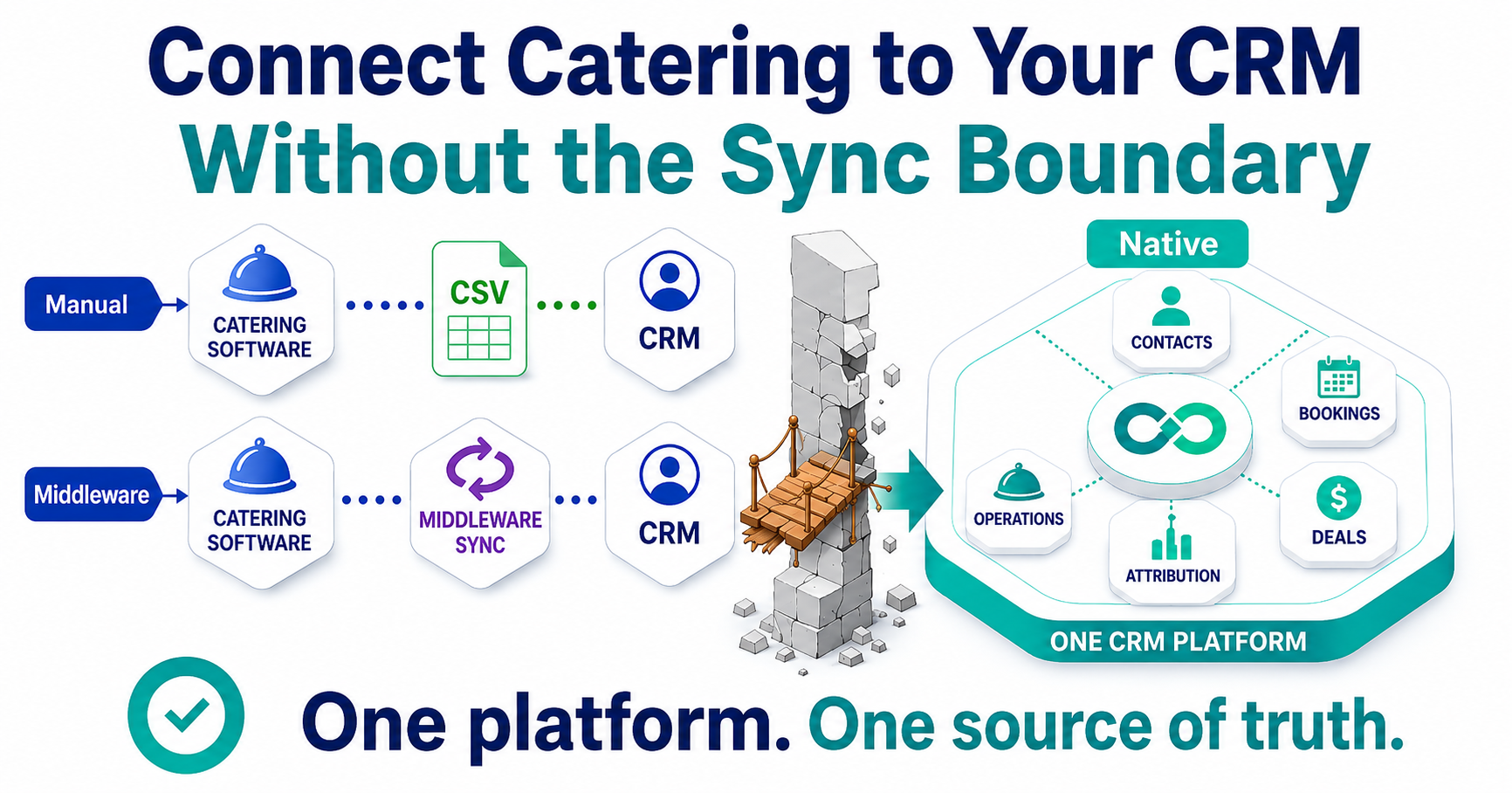
There are three ways to connect catering software to a CRM: manual export and import, a middleware sync such as Zapier or an iPaaS, or a native app built on the CRM platform itself. Only the native path removes the sync boundary, the field mapping, authentication, and update-timing layer where connections break. This is what CaterSuite does on HubSpot: catering operations that write to the same contact records your marketing and sales already use, with nothing to sync.
Monday, 6:40 AM. The failure notice from the sync job arrives before you do: "Task errored, record not found." You flag it for your desk. By 9:00, there's a second problem, and it's worse than the error because nobody flagged it at all: the month-end attribution report doesn't reconcile. Marketing's dashboard shows 40 catering leads this month. The catering system shows 31 bookings. Sales is certain they closed more than that.
You know where the gap lives, because you've traced it before. The sync matches records on the email address. Sales books events under the company name, half the time with the venue coordinator's email instead of the contact who filled out the form. So a third of the records on one side are duplicates or orphans on the other, the campaign-to-booking trail dies at the boundary, and the attribution number that goes in the deck is a guess wearing a percentage sign.
Nobody built this on purpose. The catering platform was chosen for operations, and it's good at operations. The CRM was chosen for marketing and sales, and it's good at that. The connector in the middle was, at the time, the only way to make them talk. And you, the person who owns the HubSpot instance, are the one who gets paged when they stop talking.
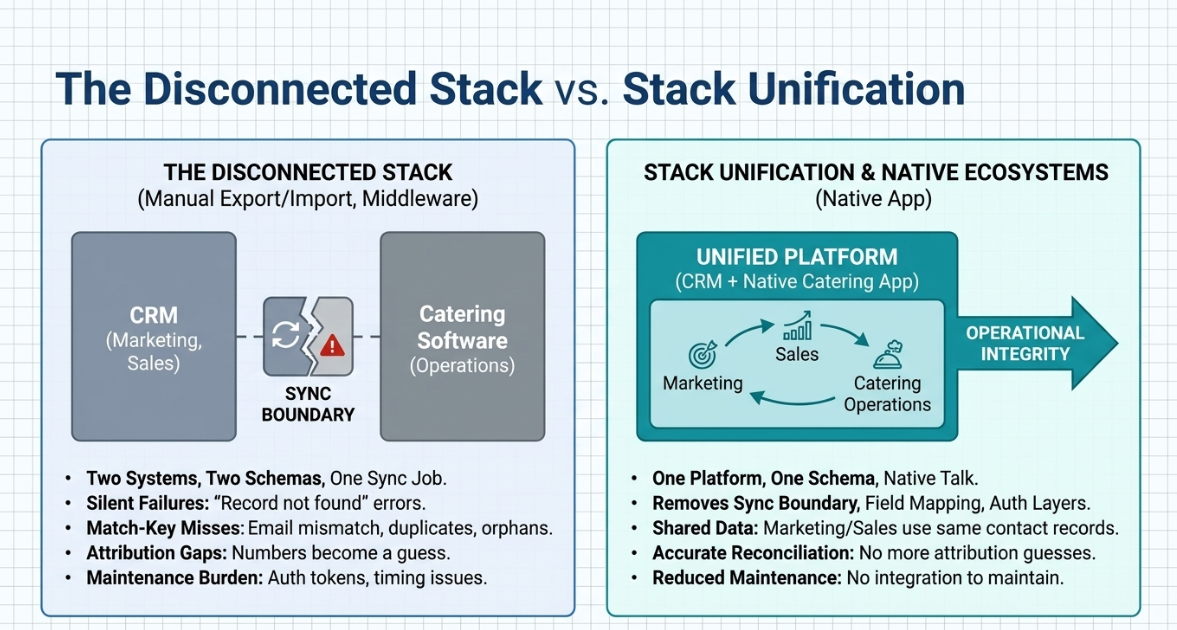
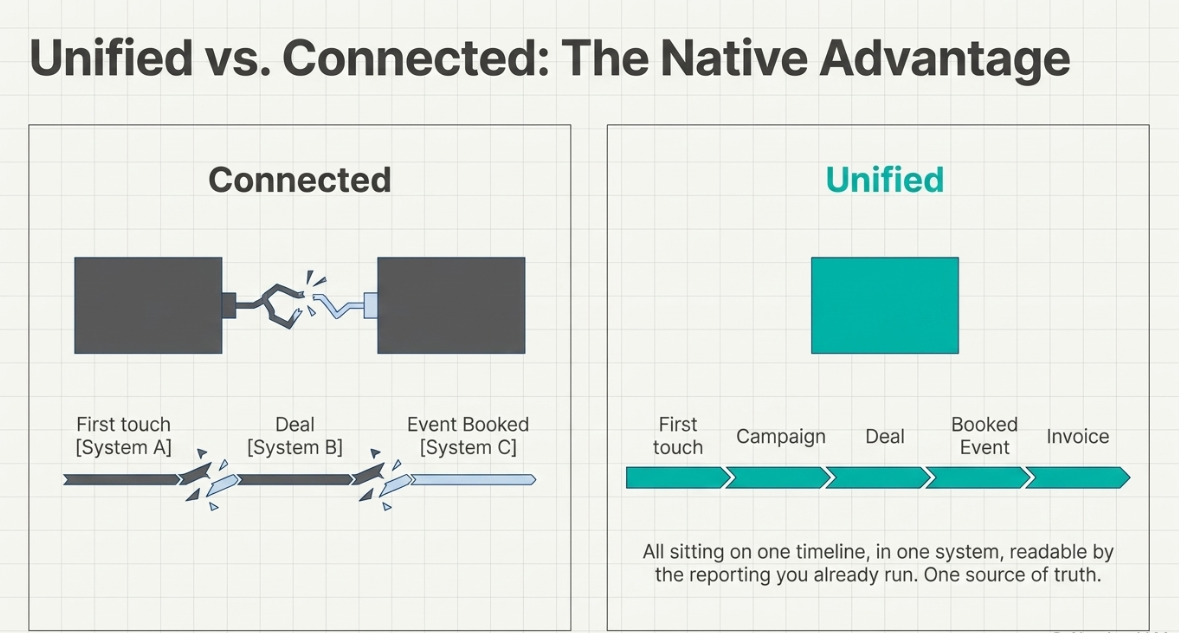
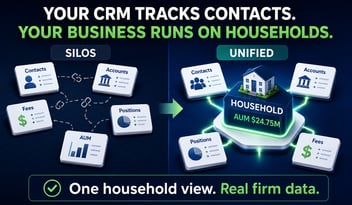
Before evaluating any fix, name the pattern. Every way of connecting catering software to a CRM, short of one, shares a single failure mode: two systems, two schemas, one sync job in between. The field mapping, the auth token, the update timing, all of it lives at that boundary, and the boundary is where connections break. The alternative has a name: Stack Unification, marketing, sales, and catering operations on one platform, so they talk to each other natively rather than through an integration somebody has to maintain. The rest of this article honestly walks through the three connection paths, including where each one genuinely fits.
The Three Ways to Connect Catering Software to a CRM
Path 1, Manual export and import
CSV out of one system, CSV into the other. This is a legitimate path for a very small operation: low event volume, no attribution requirements, one person touching both systems. It fails on two axes as soon as those conditions change. Latency: your CRM is only as current as the last export, so a lead that came in on Tuesday doesn't exist in your workflows until someone runs the import. And human error, one mis-mapped column in one import, and you're deduplicating for a week. By the time a team has a dedicated marketing function, weekly CSVs cannot support attribution, lifecycle stages, or automated follow-up.
Path 2, Middleware sync (Zapier or an iPaaS)
The middle path, and the most common one. A connector watches for changes in one system and writes them to the other, matching records on a key field. Here is the honest case for it: if your CRM is not HubSpot and your catering platform ships no native app for your CRM, middleware is the right answer, often the only one.
But be clear-eyed about what middleware is: not a purchase, a maintenance commitment. Field mappings drift when either vendor ships an update. Authentication expires. Match logic that worked at 500 contacts misbehaves at 5,000. And failures are silent, the sync doesn't announce that it's writing wrong data; a report just stops reconciling, and a human has to notice. The cross-industry data matches the lived experience: MuleSoft's Connectivity Benchmark, a survey of 1,050 IT leaders, found organizations run an average of 897 applications with only about 29% of them integrated, and that roughly 39% of IT team time goes to designing, building, and testing custom integrations. That is enterprise data, not catering data, but its shape is familiar to anyone who owns a sync.
Path 3, A native app on the CRM platform
The third path isn't a connection at all. Per HubSpot's developer documentation, apps built on the platform's own framework work with CRM objects directly; an app's objects live in your portal and behave like HubSpot's standard objects. A booking written by a native catering app lands on the same contact record that your marketing attribution reads. There is no field mapping to maintain, no sync job to monitor, and no boundary to break, because there is no second system.
|
Path |
Genuinely fits |
Where it breaks |
|
Manual export/import |
Very small operations; low volume; no attribution requirements |
Latency, human error, and no automation triggers |
|
Middleware / iPaaS |
Teams whose CRM is not HubSpot; no native app available |
Field-mapping drift, auth expiry, silent failures, permanent maintenance load |
|
Native app |
Teams already on HubSpot, or moving there |
Nothing at the boundary, the constraint is platform choice, not connection quality |
What the Sync Boundary Actually Costs
The costs cluster into four lines, and only one of them shows up on an invoice.
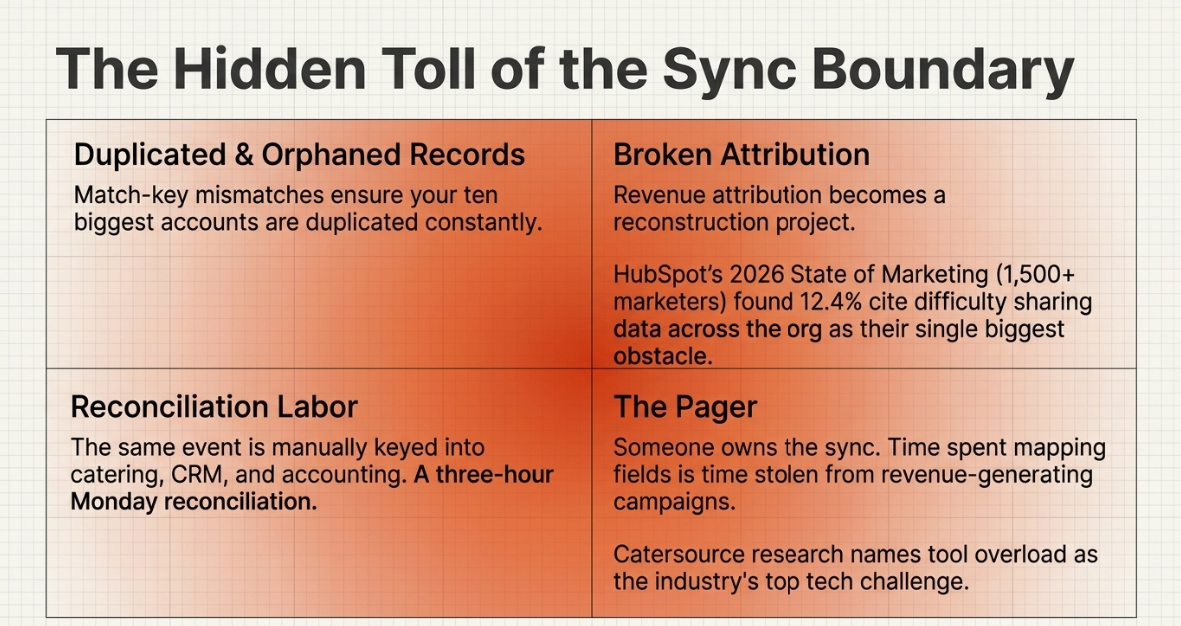
Duplicated and orphaned records. Every match-key mismatch, email versus company name, coordinator versus contact, produces a record that exists twice or belongs to nobody. Your ten biggest accounts are the most likely to be duplicated, because they're the ones with the most people touching them.
Broken attribution. When the booking lives in one system, and the campaign touch lives in another, revenue attribution becomes a reconstruction project instead of a report. This is not a niche complaint: HubSpot's 2026 State of Marketing, drawing on 1,500+ marketers, found teams consistently naming disconnected data sources, internal silos, and the absence of a centralized source of customer information among their top data challenges, with difficulty sharing data across the organization alone cited by 12.4% as their single biggest obstacle to a data-driven strategy. That's marketing-function data across industries, and it describes the catering stack precisely.
Reconciliation labor. Downstream of the same boundary, the operations team is paying in a different currency: the same event keyed into the catering system, the CRM, and accounting, with numbers that still don't match. That pattern has its own name and its own cost table, but the same booking gets typed three times. What you experience as an attribution gap, they experience as a three-hour Monday reconciliation. At the business level, it's one condition: The Disconnect, marketing, sales, and operations each running in its own system with nothing talking natively, covered in depth in why catering inquiries slip through the cracks.
The pager. Somebody owns the sync. In most catering organizations, that person is you, and the time you spend on field mapping is time not spent on the campaigns and reporting you were hired for.
The industry's own research has already reached the conclusion. Catersource's State of the Catering and Events Industry names tool overload as the biggest technology challenge operators report, and finds the most successful organizations consolidating their stacks into integrated systems that cover the workflow from inquiry through post-event analysis. That's industry consensus, not a vendor claim.
One thing deliberately absent from this section: dollar figures on middleware maintenance cost or sync failure rates. The numbers circulating online originate in iPaaS vendor marketing with undisclosed methodology, so they aren't cited here. If you've owned a sync, you don't need an invented percentage to believe the cost is real.
A Five-Question Audit of Your Current Connection
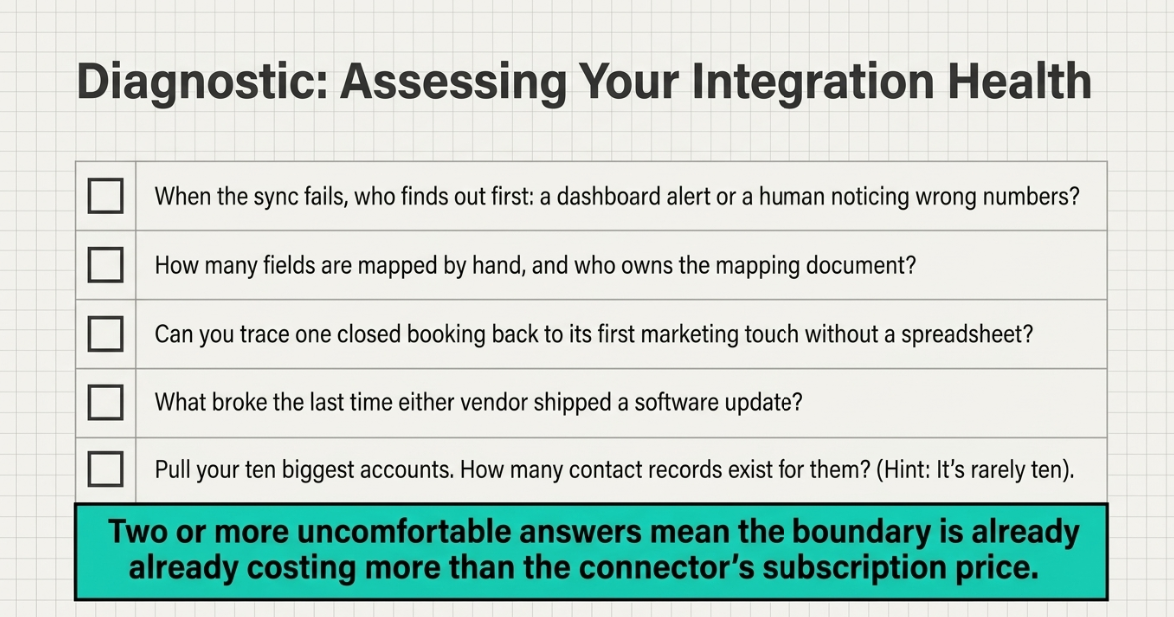
Run your current setup against these five questions. They take ten minutes, and they tell you which side of the boundary problem you're on.
- When the sync fails, who finds out first, the dashboard or a human noticing wrong numbers? If the answer is a human, your failure detection is luck.
- How many fields are mapped by hand, and who owns the mapping document? If the answer is "what mapping document," the mapping lives in one person's head.
- Can you trace one closed booking back to its first marketing touch without exporting to a spreadsheet? This is the attribution question in its simplest form.
- What broke the last time either vendor shipped an update? If you can answer from memory, you already know what the maintenance commitment costs.
- How many contact records exist for your ten biggest accounts? Pull them. The number is rarely ten.
Two or more uncomfortable answers mean the boundary is already costing more than the connector's subscription price.
Why Native Beats Connected
For a team already on HubSpot, maintaining a sync boundary is a choice, not a necessity. That's the narrow, defensible version of the argument: middleware genuinely serves teams on other CRMs, and nothing in this article claims otherwise. But if your marketing and sales already run on HubSpot, every synced record is a copy of data that could simply live where the original does.
A native catering app changes what "connected" means. The inquiry that comes through a HubSpot form is already a contact. The deal your sales team works on is already tied to that contact. When the event books, the booking is written to the same record, per HubSpot's developer platform, app-owned objects sit in the portal as standard CRM objects, associated with contacts and deals the same way HubSpot's own objects are. Attribution stops being a reconstruction: first touch, campaign, deal, booked event, and invoice sit on one timeline, in one system, readable by the reporting you already run. There is one source of truth because there is only one place where the data exists.
For the workflow-level view of what this looks like in daily operation, inquiry handling, pipelines, and booking management, see how catering businesses use HubSpot to manage bookings.
Where to Go From Here
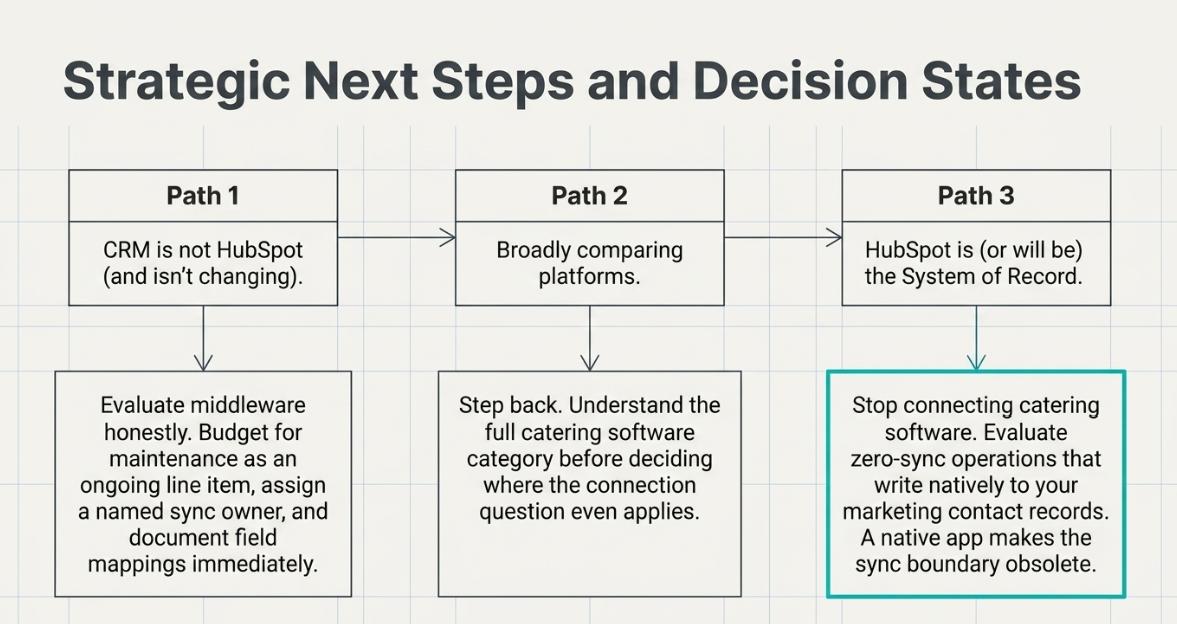
Three decision states, three moves.
If your CRM is not HubSpot and isn't changing, evaluate middleware honestly. Budget for maintenance as an ongoing line item, assign a named owner for the sync, and document the field mapping before the person who built it leaves.
If you're still comparing platforms broadly, start with the full catering software comparison to understand the category before deciding where the connection question even applies.
If HubSpot is your system of record, or is about to be, the reliable way to connect catering software to your CRM is to stop connecting it. Evaluate catering operations that write to the same contact record your marketing reads, and pressure-test it against the five-question audit above. A native app should make all five questions moot.
The CaterSuite Perspective
The reliable integration is the one that doesn't exist. CaterSuite was built on HubSpot rather than connected to it, because the sync boundary is where catering data goes to die, the mapping drifts, the token expires, and the attribution report quietly stops being true. The operating belief behind the product is that a catering operation's inquiries, quotes, bookings, and follow-ups belong on the same platform its marketing and sales already run on, as native objects rather than synced copies. Not because integrations are bad engineering, but because for a HubSpot team, the best-maintained sync still loses to no sync at all.
Frequently Asked Questions
Can I connect my existing catering software to HubSpot with Zapier?
Yes. Zapier and similar tools can pass contacts, bookings, and status changes between most catering platforms and HubSpot. The honest caveats: you own the field mapping, failures are silent until a report doesn't reconcile, and match-key mismatches produce duplicate records over time. It works; it just never stops needing an owner.
What's the difference between a native HubSpot app and an integration?
An integration is two systems exchanging copies of data through a sync layer. A native app runs on HubSpot's own developer platform and works with CRM objects directly; its records live in your portal and behave like standard HubSpot objects. The practical difference: an integration has a boundary that must be mapped, authenticated, and monitored; a native app has no boundary at all.
Does this work for caterers who already use HubSpot?
Yes, CaterSuite is built on HubSpot. If your marketing or sales already runs on HubSpot, catering operations join the same platform without integrations. An inquiry from a form lands on the same contact record as a referral from your sales team. One contact record, one pipeline, one source of truth across marketing, sales, and operations.
What happens to marketing attribution when catering runs on a separate system?
It becomes a reconstruction. The campaign touches lives in the CRM; the booked revenue lives in the catering platform; the join between them depends on the sync's match key. Every mismatch, a different email, a company-name booking, breaks the trail, so attribution reports undercount the channels that actually produce events.
What is Stack Unification?
Stack Unification is marketing, sales, and catering operations running on one platform, HubSpot, so they talk to each other natively rather than through integrations that have to be maintained. It's the structural alternative to the sync boundary: instead of connecting systems more carefully, there's one system and nothing to connect.
Do I need middleware if my CRM isn't HubSpot?
Usually, yes. If your organization runs Salesforce or another CRM as its system of record and your catering platform offers no native app for it, middleware is the legitimate path, and a well-owned middleware setup beats manual exports every time. The argument in this article is narrower: for teams already on HubSpot, the boundary is optional.
How long does it take to move catering operations onto HubSpot?
It depends on the state of your current data, clean contact records, and a well-defined pipeline that moves faster than years of duplicates. As a rule, the migration work is mostly data hygiene, not software setup, and teams that already run marketing and sales on HubSpot have the shortest path because the contact base is already home.
See Catering Operations Run on the Platform You Already Own
Bring the attribution report that doesn't reconcile. In a 30-minute walkthrough, see how CaterSuite runs marketing, sales, and catering operations on one HubSpot portal, one contact record from first touch to booked event, with no sync in the middle.
Leave a Comment