


Mobile CRM is a CRM client built for phones and tablets, giving sales and service teams access to customer records, pipeline, and communication history away from a desk. Access is no longer the differentiator: every major CRM ships a competent mobile client. The open question in 2026 is whether the system acts at the moment of customer contact or simply gives the rep a screen to log what already happened.
The rollout goes like this. Licenses assigned, mobile client deployed, reps trained on a Tuesday. The point was that deals would stop going stale between the meeting and the desk. A rep walks out of a client's office, sits in the parking lot, and updates the opportunity while it's fresh. Twelve months later, adoption reports look fine. Pipeline is about as current as it was before.
Here's what actually happened: the reps who update records are the same reps who always updated records. The ones who don't are the ones who never did. The organization bought the same data entry, on a smaller screen, and Gartner's seller research explains why, without blaming anyone. In a survey of B2B sellers, 72% said they felt overwhelmed by the number of skills their job now requires, and overwhelmed sellers were 45% less likely to attain quota. The mobile client wasn't tool number one. It was tool number nine.
What mobile CRM is, and what it solves
Mobile CRM is the CRM delivered to a handheld device: contact and account records, pipeline and deal stages, activity history, and communication tools, available wherever the rep is. The problem it solved was real and worth solving. Sales and service work happens away from desks, in cars, at client sites, between meetings, and for years the CRM only existed at one of those places. Everything else waited.
The benefits the category claimed were accurate, and they still are. Real-time access to customer data, so the rep walks into a meeting knowing what happened on the last call. Faster response times through push notifications and alerts. Collaboration that doesn't wait for someone to get back to the office. A better customer experience, because the person in front of the customer has the history in hand. None of that was oversold. The access problem was genuine, and mobile CRM closed it.
The mobile CRM category in 2026: what actually distinguishes these tools
Every serious CRM platform now ships a mobile client, and the honest summary is that they've converged. Salesforce, HubSpot, Zoho, Pipedrive, and Microsoft Dynamics all put the record in your pocket competently. Contact management, pipeline views, activity logging, and notifications are table stakes across the category, which means the interesting differences are not in the feature grid.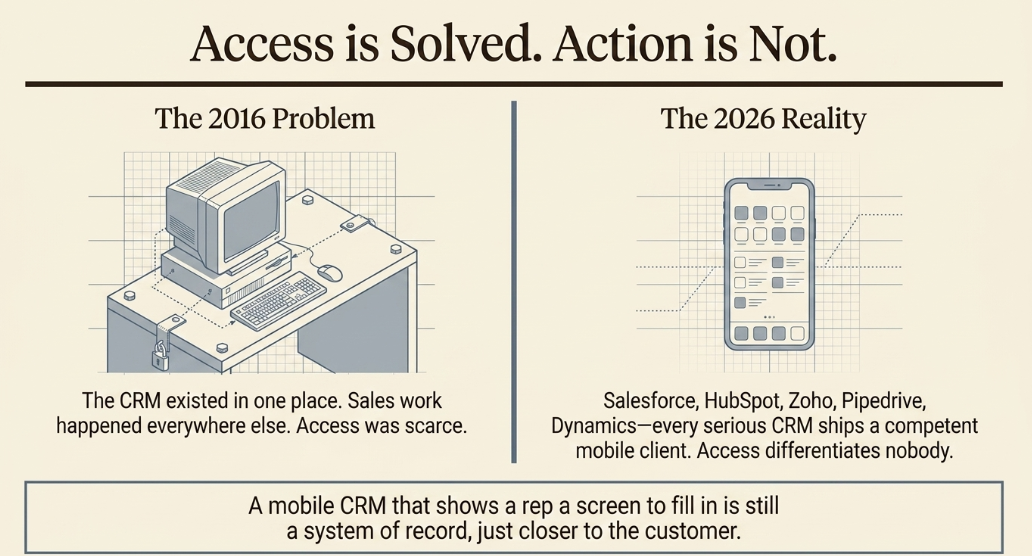
The five criteria that still matter
Five evaluation criteria have held up, and they remain the right place to start:
- Offline access. Whether the client works with no signal, and what happens to edits made while disconnected.
- Automation. Whether built-in workflows remove repetitive tasks or simply relocate them.
- Real-time notifications. Whether the rep learns about a signal while it's still actionable.
- Customization. Whether the mobile view can be shaped to how your team actually sells, or only to how the desktop was configured.
- Integration. Whether the client syncs cleanly with email, calendar, marketing automation, and the communication tools your reps live in.
Where the real trade-offs sit
Underneath those criteria, three trade-offs separate the tools in practice.
The first is depth versus speed. Clients built to mirror a full desktop CRM can do almost anything and require deliberate navigation to do it; clients built for a narrow pipeline motion are fast and hit walls. Neither is wrong. The question is whether your reps need range or velocity.
The second is configuration inheritance. Some clients render whatever the desktop admin configured, including complexity that was tolerable on a large screen and isn't on a phone. Others let mobile be configured separately, which costs admin time and buys usability.
The third is what a notification carries. This is the one that matters most and gets evaluated least. Every client can send an alert. Very few tell the rep what to do about it. Gartner's framework for seller time decomposes the sales call into demonstrating solutions, handling objections, summarizing the conversation, and setting next best actions. Note that setting the next action sits inside the call, not in the admin work afterward. A notification that names the signal but not the action pushes that work back to the parking lot.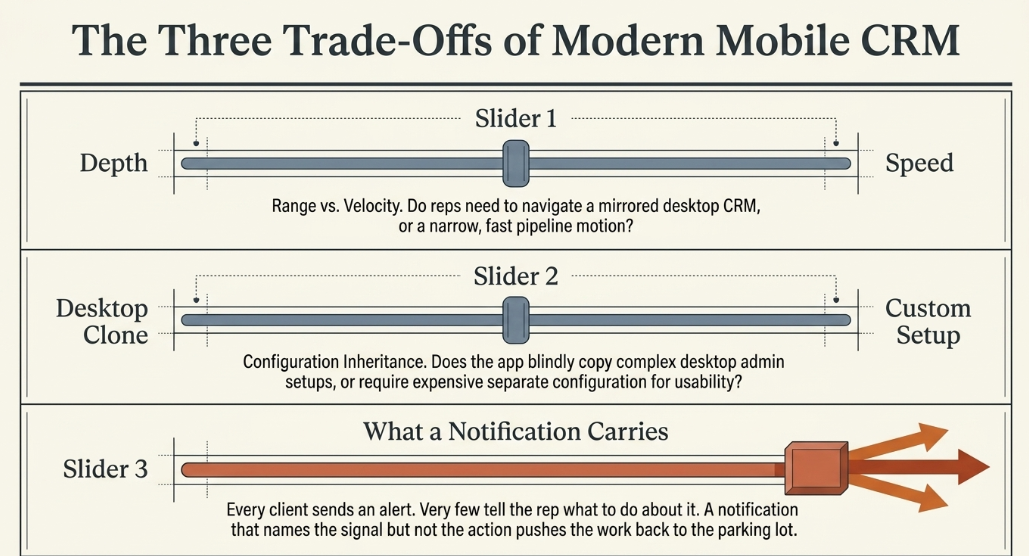
Who does this affect in 2026
If you run RevOps or carry a sales number at an enterprise or upper-mid-market company, you've likely already bought this. The mobile client is deployed, adoption is somewhere between adequate and disappointing, and it's not obvious what a better one would change. You may also be evaluating a replacement, on the theory that the tool was the problem. The next three sections are about why that theory usually doesn't survive contact with the rollout.
What changed: access is solved, action is not
What held then still holds: reps need the customer record where the work happens, and putting it on a phone was the correct answer to that. What changed is that access stopped being scarce. Every CRM has a competent mobile client now, so having one differentiates nobody. The constraint moved from access to action, and a mobile CRM that shows a rep a screen to fill in is still a system of record, just closer to the customer.
The evidence for the shift is current and specific. Gartner's May 2026 research on AI-enabled next best actions, from a survey of 227 chief sales officers conducted August through September 2025, found that sales organizations providing sellers with AI-enabled next best actions are 2.6x more likely to achieve commercial growth. Gartner's Greg Hessong put the mechanism plainly: the most effective organizations are "not simply layering AI onto existing ways of working", they're redesigning workflows so the system supports execution and orchestration, and sellers spend their judgment where it counts. Gartner also predicts that by 2027, 95% of sellers' research workflows will begin with AI, up from under 20% in 2024.
There's a matching finding on the leadership side. Gartner's research on sales transformation found that only 11% of sales organizations drive commercial success while executing a transformation, across a survey of 234 sales leaders conducted May through June 2024, and that what separates top performers is "action-centered insight and design." Insight that terminates in a dashboard isn't the same asset as insight that terminates in an action.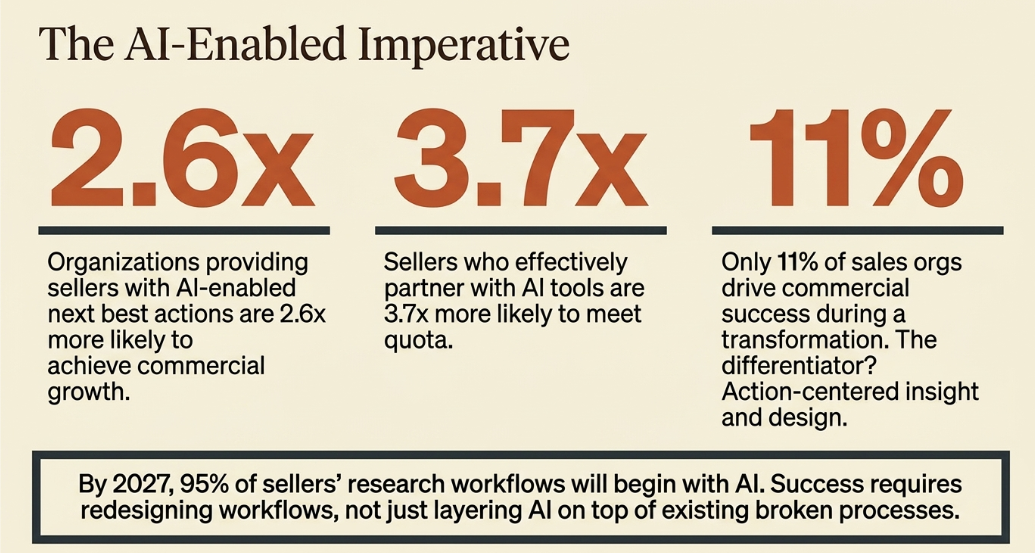
The Activation Edge: where the system meets the customer
The Activation Edge is the moment of customer contact, where the system either acts or defers. It's the call being taken, the site visit happening, the inbound question landing. Mobile CRM was the first serious attempt to reach that edge, and it got the proximity exactly right: the rep in the field is the edge. What it got wrong was the capability. Proximity without action is a screen at the edge, not a system at it.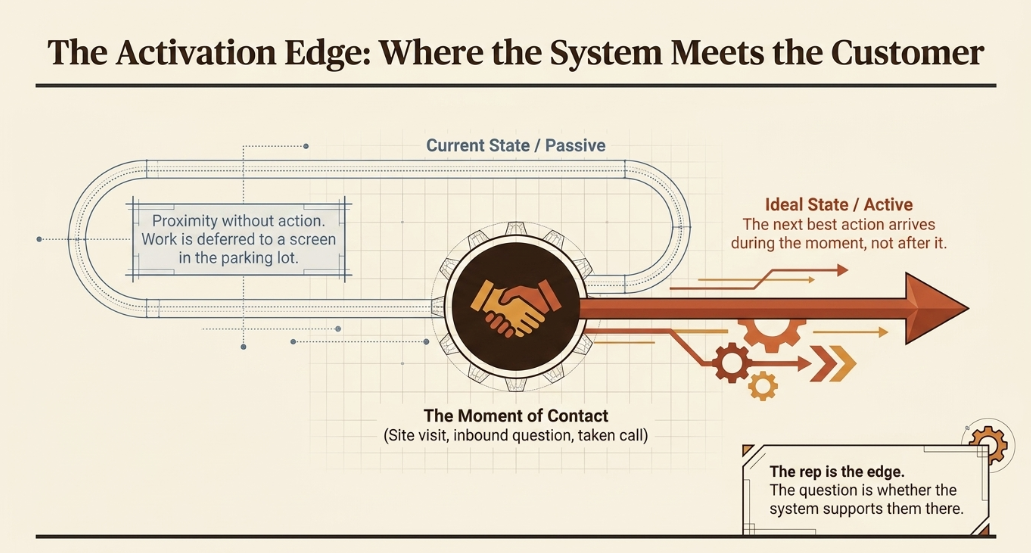
The old framing of "faster response times through instant push notifications" was already standing on this idea without a name for it. The name comes with a requirement attached. At the Activation Edge, the question isn't whether the rep can reach the record; it's whether the next best action arrives during the moment or gets typed in after it. That's the difference between a system of record and a System of Action: one stores what happened, the other senses the signal and executes on it without waiting for someone to move the deal forward. Getting there is less about the client on the phone and more about making the system act on the follow-up rather than reminding a person to.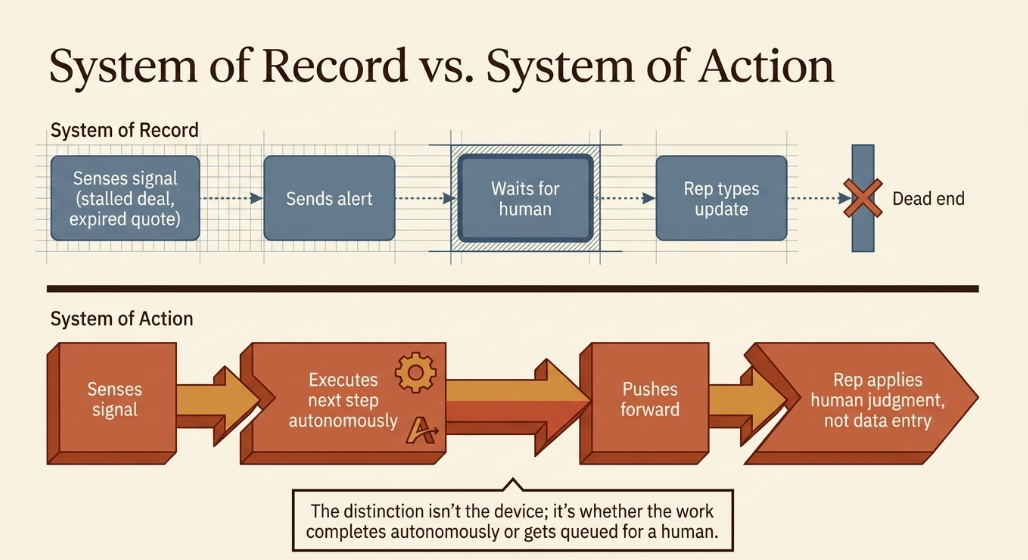
Why reps don't use the mobile CRM you bought them
Adoption failures here are a capability mismatch, not a discipline problem, and the evidence is unambiguous. Gartner's seller survey found 72% of sellers are overwhelmed by the number of skills their role demands, and overwhelmed sellers 45% less likely to hit quota. Meanwhile, 57% of chief sales officers name new or improved tools among their top three productivity levers, and sales organizations have run an average of four transformations in two years, efforts Hessong describes as "yielding diminishing returns as many sellers are feeling overwhelmed."
Put those together, and the rollout story writes itself. The lever leadership reached for was a tool. The tool was a screen. The rep it was handed to was already at capacity.
You're looking at a capability mismatch rather than an adoption problem if:
- The reps using the mobile client are exactly the reps who kept records current before it existed.
- Notifications get dismissed rather than acted on, because acting on them requires work the notification doesn't do.
- Pipeline accuracy improved for the week after training and returned to baseline by the month.
- Your remediation plan is a better mobile client, and nobody can articulate what "better" would do differently.
Worth noting the flip side from the same Gartner research: sellers who effectively partner with AI tools were 3.7x more likely to meet quota. The problem isn't technology in the rep's hand. It's technology that adds a task instead of removing one.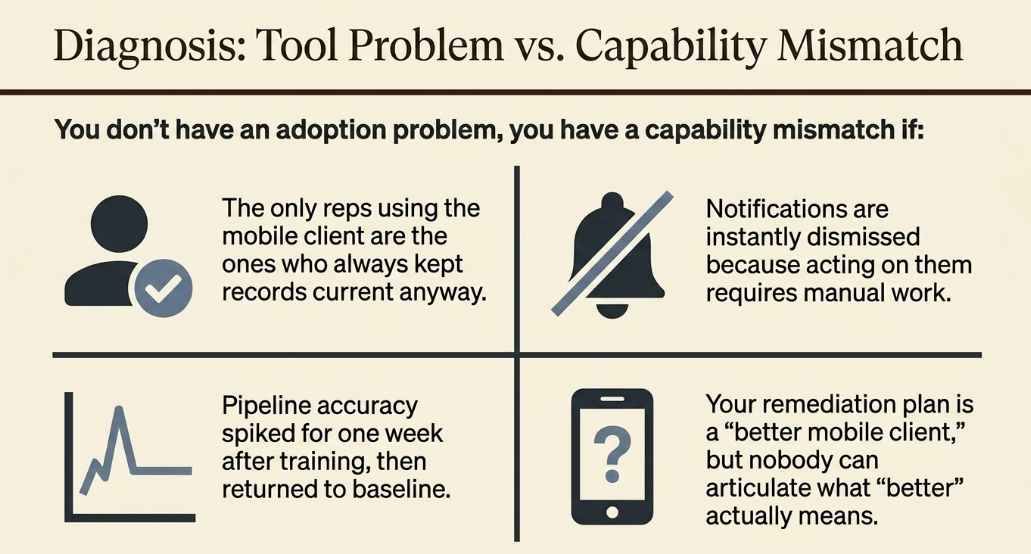
Evaluating a mobile CRM against a 2026 requirement: the decision table
|
Criterion |
What it meant when access was the constraint |
What does it mean now that action is |
|
Offline access |
Can the rep open the record with no signal? |
Does work queued offline execute on reconnect, or wait for a person? |
|
Automation |
Are there workflows that cut repetitive tasks? |
Does the workflow complete the task, or hand the rep a shorter task? |
|
Real-time notifications |
Does the rep learn about the signal quickly? |
Does the alert carry the next best action, or just the alert? |
|
Customization |
Can the mobile view match how we sell? |
Can the system act on that view without a human interpreting it first? |
|
Integration |
Does it sync with email, calendar, and marketing tools? |
Do those systems share one picture the AI can act on, or five that reconcile later? |
No row implies the mobile CRM was a mistake. Each shows a criterion correctly specified for access, now carrying a second requirement nobody wrote into the original evaluation.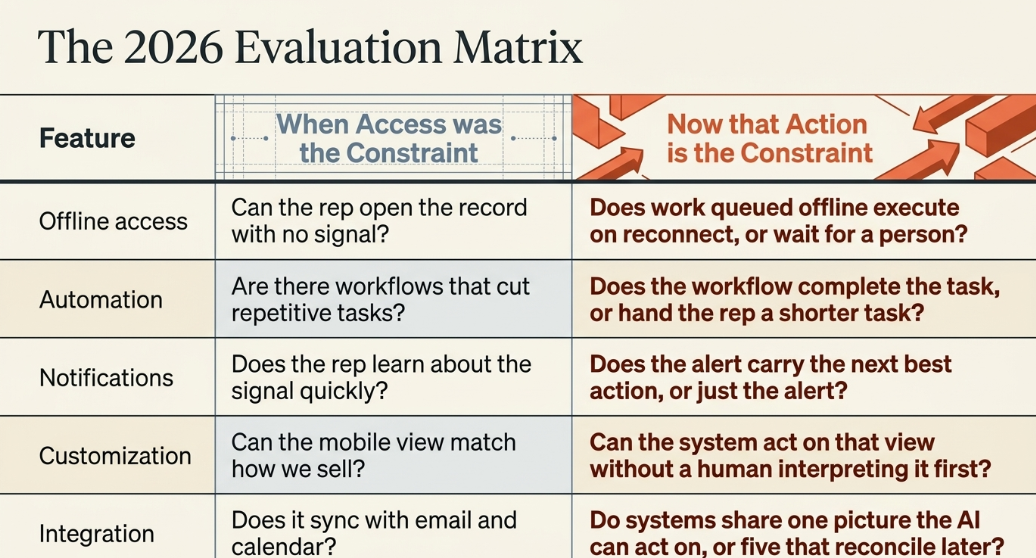
The CETDIGIT perspective
CETDIGIT's position is that the answer to a mobile CRM nobody uses is not a better mobile CRM. It's orchestration: the layer that turns a signal into an executed action instead of into a notification. That's the System of Action, the system senses that the deal has gone quiet, that the quote expired, that the inbound question arrived on a Saturday, and it does the next thing rather than telling a rep to. Once that layer exists, Revenue Intelligence becomes possible too: you can measure whether the actions the system took produced revenue, rather than measuring whether reps logged their activity. Reps stop being the system's data entry clerks and become the reason it's worth having, the judgment at the edge that no agent supplies. That's what the orchestration layer behind the moment of contact is built to do. We orchestrate that architecture; we don't sell you another client for the phone.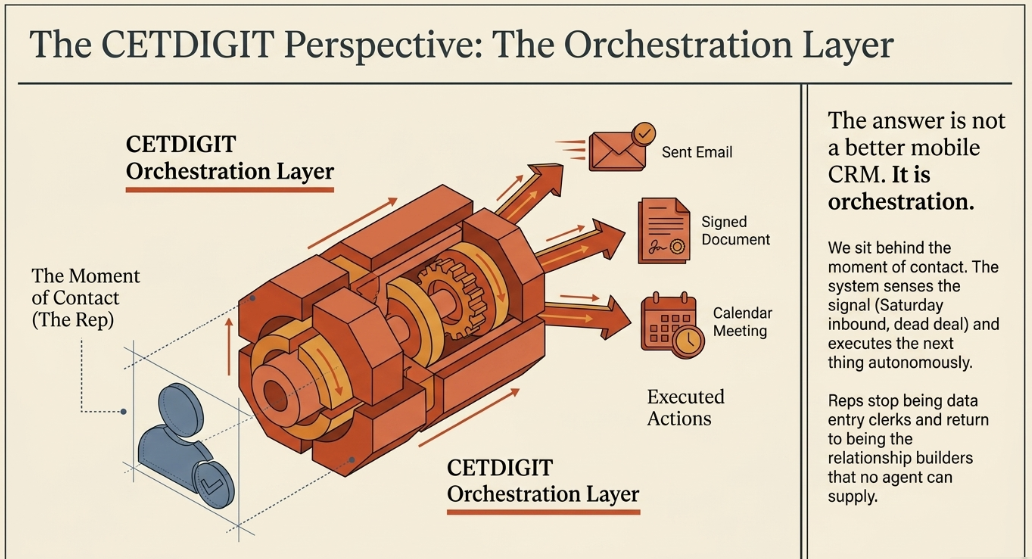
Recommended path
If your mobile rollout worked exactly as specified and changed nothing, the gap is between access and action, and it doesn't close by re-buying access. Start with where deals are actually going quiet: the follow-ups that didn't happen, the signals that arrived while nobody was watching, the next actions that got deferred to a drive home. CETDIGIT's AI Sales Workflows work is where that gets rebuilt; the system executes the follow-up instead of reminding someone to. It sits inside CETDIGIT's broader AI services framework if you want to see how the pieces connect before deciding where to start.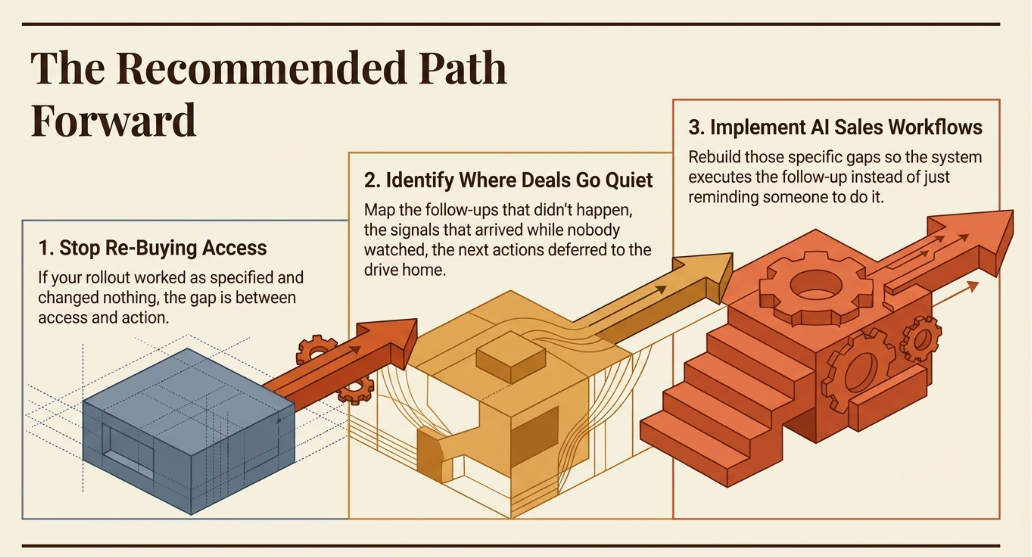
Frequently asked questions
What is mobile CRM?
Mobile CRM is a CRM client built for phones and tablets that gives sales and service teams access to customer records, pipeline, activity history, and communication tools away from a desk. It solved a real problem: sales work happens in cars, at client sites, and between meetings, while the CRM only existed in one place. Every major CRM platform now ships a competent mobile client, which means access itself no longer differentiates one from another.
What are the best mobile CRM apps?
The honest answer is that the category has converged, so "best" depends on your motion rather than a ranking. Salesforce, HubSpot, Zoho, Pipedrive, and Microsoft Dynamics all deliver competent mobile clients with contact management, pipeline views, activity logging, and notifications. Evaluate on three trade-offs instead: depth versus speed, whether mobile can be configured separately from desktop, and, most importantly, whether a notification carries a next action or only an alert.
Do sales reps actually use mobile CRM?
Some do, and it's usually the reps who kept records current already. Gartner's seller survey found 72% of sellers feel overwhelmed by the number of skills their job requires, and overwhelmed sellers are 45% less likely to attain quota. Meanwhile, 57% of chief sales officers reach for new or improved tools as a top productivity lever. That combination explains most rollouts: the tool was the lever, and the rep it was handed to was already at capacity. Adoption failures here are a capability mismatch, not a discipline problem.
Is mobile CRM worth it for field sales teams?
Yes, for what it does, field teams genuinely need the record where the work happens, and that need hasn't changed. The mistake is expecting access to produce outcomes. Gartner found that organizations providing AI-enabled next best actions are 2.6x more likely to achieve commercial growth, which is a different capability from record access. For a field team, the highest-value question isn't which client to deploy; it's whether the system acts when a signal fires while your rep is on a site.
What should a mobile CRM be able to do in 2026?
It should do what it always did: records, pipeline, history, offline access, and one thing more: deliver the next best action at the moment of contact rather than a field to fill in afterward. Gartner's seller-time framework places setting next best actions inside the sales call itself, not in the admin work that follows. A client who defers that step to a parking lot has moved the data entry, not removed it. That capability usually lives in the orchestration layer, not the mobile app.
What's the difference between a CRM that records and a CRM that acts?
A system of record stores what happened and waits for a person to decide what's next. A System of Action senses a signal, a stalled deal, an expired quote, an inbound question, and executes the next step without waiting. The distinction isn't the device or the interface; it's whether the work completes autonomously or gets queued for a human. Most mobile CRM rollouts deliver a system of record positioned closer to the customer, which is a real improvement and a different thing entirely.
Why didn't our mobile CRM rollout improve pipeline visibility?
Pipeline visibility is downstream of whether the system captures work automatically, and a mobile client asks a person to capture it manually. If updates depend on a rep choosing to type them, mobile changes where the typing happens, not whether it happens. Gartner's finding that only 11% of sales organizations drive commercial success during transformation points at the pattern: the top performers are distinguished by action-centered design, meaning insight that terminates in an executed action rather than a screen someone has to fill in.
Revenue Leak Assessment
20-minute call, no pitch, we will show you exactly which deals you are losing right now. We'll look at where signals are firing without anything acting on them, and what it would take for the system to close the follow-up instead of your reps remembering to.
Leave a Comment