


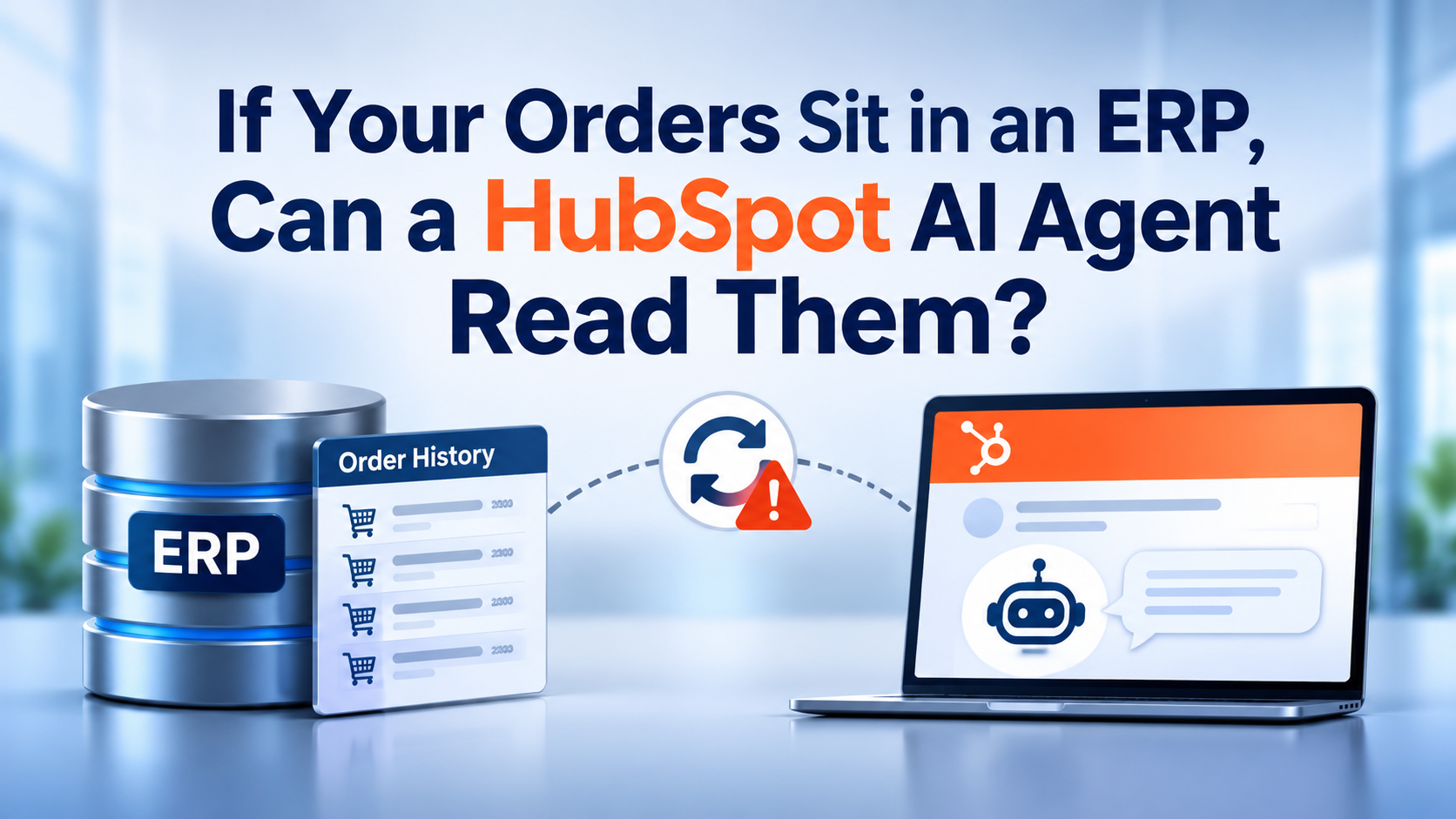
Direct answer. An AI agent in HubSpot can read your ERP order history only if that history has been synced into HubSpot records, because HubSpot has no native ERP connection. Without a sync, the agent answers order questions from whatever HubSpot holds, plus the web if its builder allows that. The gap has a name: Context Collapse: the AI reads from several disconnected sources and reconciles none of them, so a confident answer can still miss every order.
A Wednesday account review that shows the gap
This scene is an illustrative composite, not a client, and it shows the whole problem in one meeting.
It is Wednesday morning, and the account review has reached a customer who has bought from you for years. The operations lead has the ERP open on one screen. It shows the customer's last three orders: one in the summer, one in early autumn, one three weeks ago, each a little smaller than the one before. The sales lead has HubSpot open on the other screen. The company record shows one logged call in March and nothing else since.
Someone asks the AI in HubSpot what is happening with the account. The answer comes back quickly and reads well. It says the relationship has gone quiet and suggests a check-in call. It says nothing about orders, because as far as HubSpot knows, there have not been any.
Nobody in the room thinks the AI made something up. It answered from what it could see. The trouble is that what it could see was one call in March, and the thing that mattered, three shrinking orders, lived in a system it had never been given. The answer was confident, and it was wrong, and the only reason anyone caught it was that both screens happened to be open at the same time.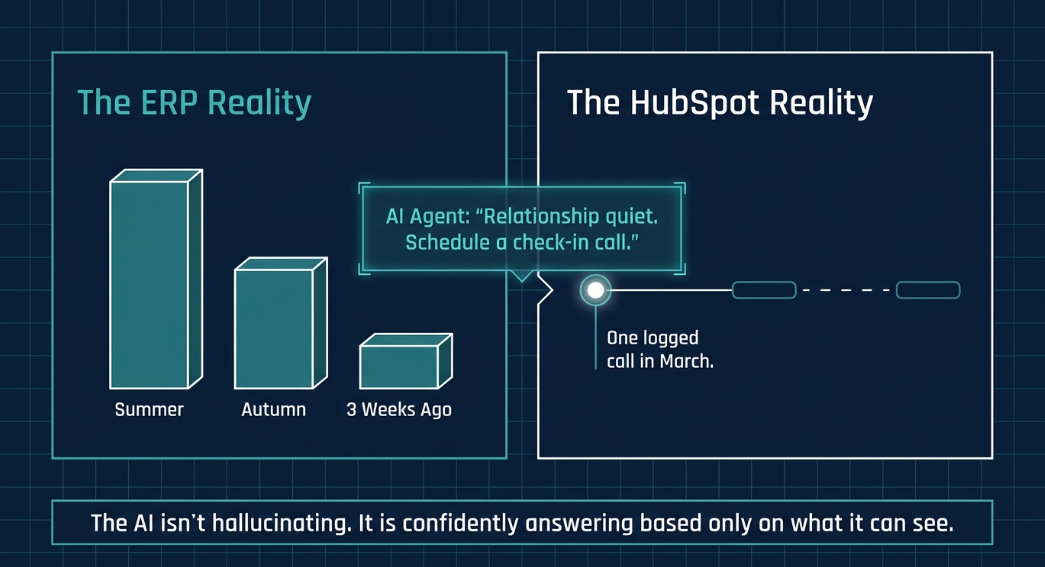
Most weeks they are not. Most weeks the AI's answer is read on its own, by one person, in one system, and nobody checks it against the other.
The problem is Context Collapse, not a bad model
Context Collapse is what happens when the AI reads from several disconnected sources and reconciles none of them. In plain words: the order history sits in one system, the conversations sit in another, and the AI answers from whichever one it was pointed at, without saying what it could not see.
That is why this blocker usually arrives as a complaint about tone: "It's confidently wrong." The model is not inventing orders. It is reporting accurately on an incomplete record. When order history never reaches the CRM, it is missing from every answer about that customer, however confident the answer sounds.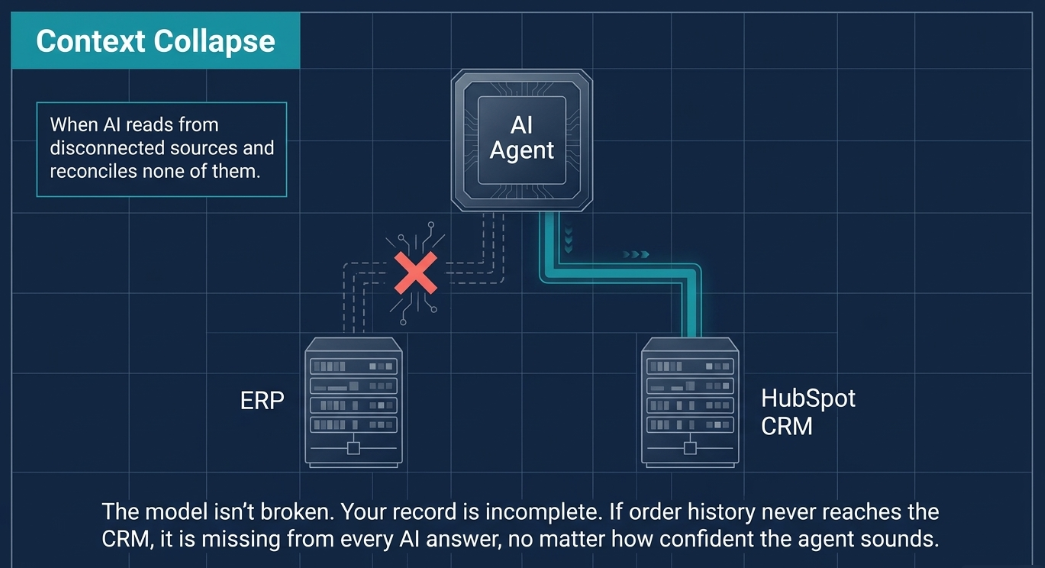
Think about what happens when a sales lead asks the AI who needs a call this week. The list it builds comes from calls, emails, meetings, and deal activity, because that is what HubSpot holds. A customer whose orders are quietly shrinking will not appear on it. The signal that would have put them there was never in the record the AI read.
HubSpot's own UNBOUND 2026 research put it plainly: AI with bad context is worse than no AI. Missing context is the most common kind of bad context, and the hardest to spot, because nothing on the screen tells you it is missing. An empty field looks exactly like a quiet customer.
The fear underneath this blocker is specific. It is the moment an AI answer reaches a customer or a manager, and someone who knows the account says, "That's not right, they ordered last month." That fear is reasonable. It is also avoidable, though not by switching models or writing longer prompts. It is avoided by answering one question before anything else: which records can this AI actually read?
Who this affects
This affects mid-market B2B companies that run sales and service in HubSpot and keep orders, invoices, and fulfilment in a separate ERP. Three roles feel it first.
The owner feels it when an AI summary of a key customer contradicts what the finance report says about the same customer. The operations lead feels it because they know exactly where the order data lives and suspect nobody has asked whether the AI can see it. The sales or RevOps lead feels it most, because they are usually the person who turned the AI on, and the person asked why it recommended a check-in call to a customer who placed an order on Monday.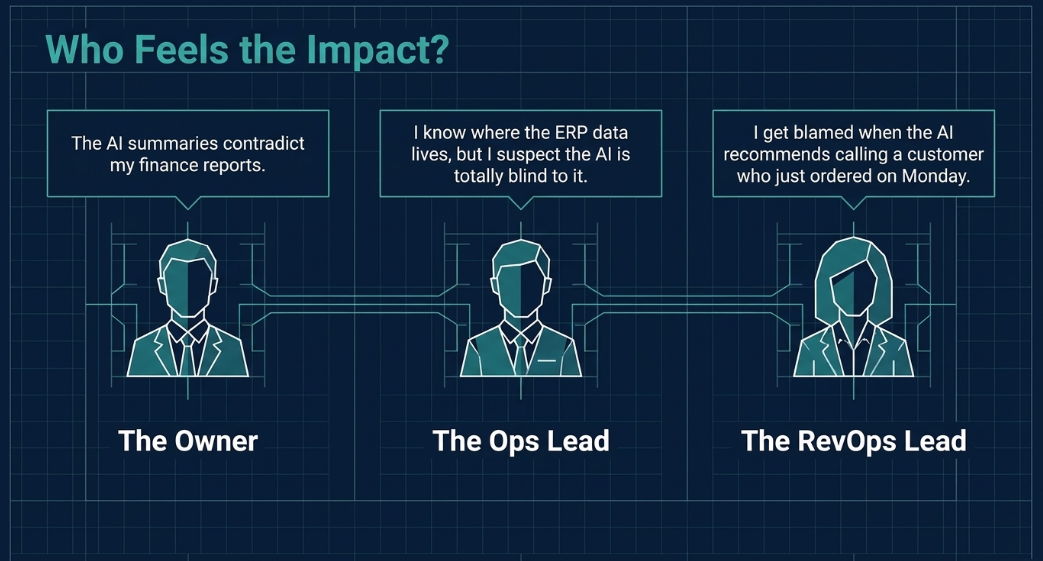
Most of these companies have already tried AI in HubSpot. Many have watched a pilot fade after a few weeks, not because the answers were nonsense, but because nobody trusted them enough to act on them. If your orders and your customer conversations live in different systems, this is about you.
Six signs your AI cannot see your order history
These six signs show that the AI in your HubSpot is answering without your order history. Run them against your own portal.
- The AI describes a customer as quiet while your ERP shows recent orders.
- The AI's account summaries mention calls, emails, and meetings but never a purchase.
- Your HubSpot company records carry no order, invoice, or revenue history from the ERP.
- Nobody on staff can name the records the AI was set up to read.
- Your reps check the ERP before they act on anything the AI suggests.
- The AI sounds equally sure whether the record behind its answer is full or nearly empty.
If three or more of these apply, the AI is not so much wrong about your customers as blind to half of what you know about them.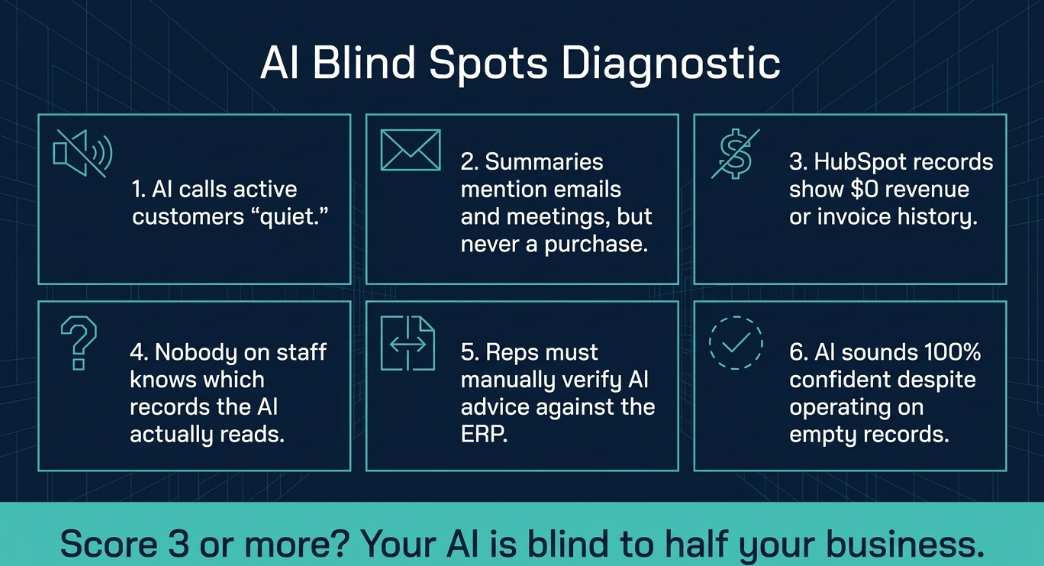
Why the order history never reaches the AI
The order history never reaches the AI for mechanical reasons: an agent reads only the sources it is given, and nothing moves ERP data into HubSpot by default. Four causes do most of the damage.
First, an agent reads what its builder allowed. HubSpot's documentation for building custom agents lists two default actions a builder chooses from: "Browse the web" and "Read your HubSpot CRM records." Reading and writing CRM records are separate choices the builder makes; they are not switched on together by default. An agent can also be pointed at particular records and given knowledge sources, such as uploaded documents. That is a defined list of sources, not the whole of your business. If the order history is in none of them, the agent does not have it. And if the honest answer to "what does it read?" is "the web", that is the problem.
Second, HubSpot has no native ERP connection. HubSpot's own app marketplace lists third-party apps that sync ERP order and invoice data into HubSpot records. Those are partner integrations, not something HubSpot builds in. Unless your company installed one and mapped the fields, the ERP's orders stay in the ERP.
Third, "orders" in HubSpot are not automatically your ERP's orders. HubSpot has its own order, line-item and invoice records. An agent reading orders in HubSpot reads whatever was put there. If your orders are processed in the ERP and nothing syncs them across, those HubSpot records may be empty or may hold only part of the picture, and the agent cannot tell the difference.
Fourth, nobody owns the question. The CRM side assumes the AI has the data. The ERP side assumes nobody needed it. Gartner has told CRM leaders plainly that the data-management work comes before AI agents can run in the CRM, and its research on AI agents in ERP platforms has cautioned buyers about overstated readiness claims. In a survey published as a sponsored editorial in MIT Technology Review, data fragmentation, the inadequate sharing of data across systems, was the most commonly cited top challenge to giving agents access to company knowledge. Forrester's 2026 research on AI agents, as reported by DATAVERSITY, found companies chasing the capability while few were getting the value they expected.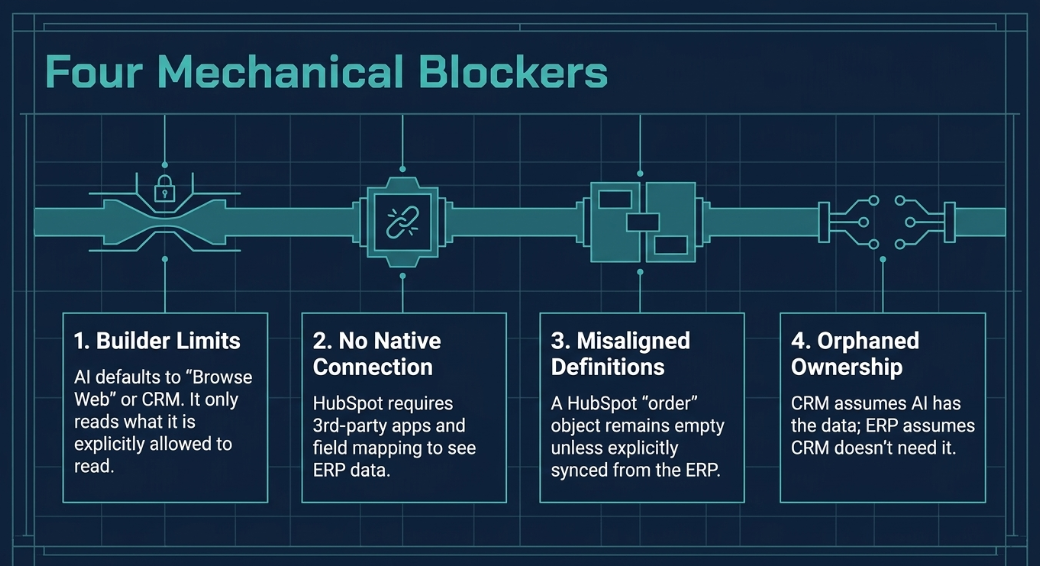
None of this means the data has to be perfect before you begin. Whether the data in HubSpot is clean enough to start is its own question, and an earlier piece in this series took it on [per rev b]. The point here is narrower: before you judge the quality of what the AI reads, find out what it reads at all.
What to do, depending on where your order data sits
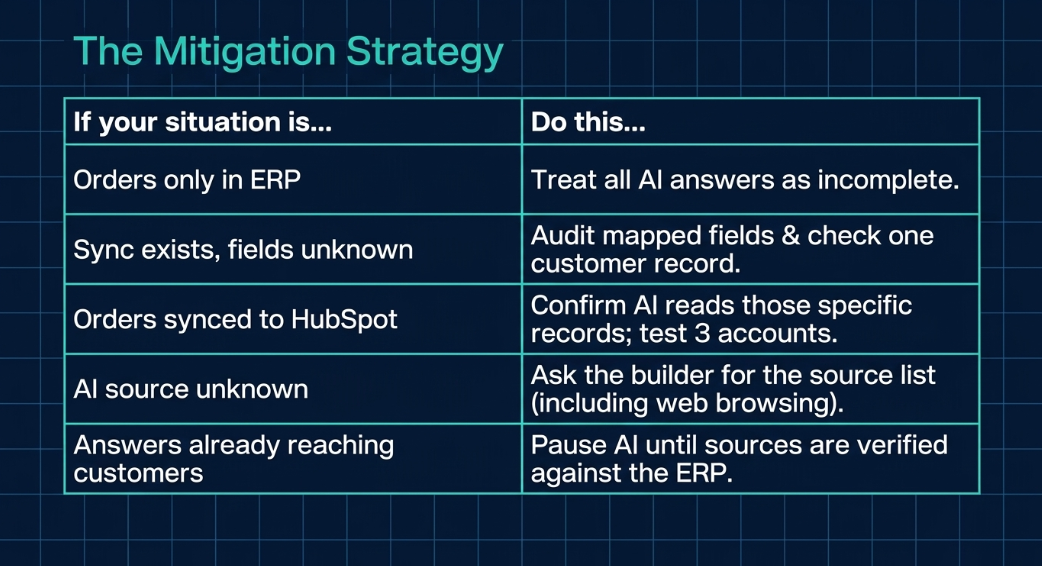
The right next step depends on whether your order history reaches HubSpot today and whether anyone can say what the AI reads.
|
If your situation is |
Do this |
|
Orders live only in the ERP, and nothing syncs them to HubSpot. |
Treat every AI answer about orders as incomplete. Decide whether the decision you want help with needs order history at all before anyone scopes a sync. |
|
An ERP sync exists, but nobody knows which fields it maps. |
List the fields that arrive in HubSpot and the records they land on. Check one customer's ERP history against their HubSpot record. |
|
A sync maps orders onto HubSpot records. |
Confirm the agent is set to read those records, then test it on three customers whose order history you know by heart. |
|
Nobody can say which records the AI was set up to read. |
Ask whoever built or switched it on for the list of sources, including whether it can browse the web. Write the answer down. |
|
The AI's order answers already reach customers or managers. |
Pause those answers until someone has checked the AI's sources against the ERP for a handful of accounts. |
The CETDIGIT perspective: start with what the agent reads
The CETDIGIT perspective is that the first answer on any AI agent should be a plain list of the records it reads, written down before anyone builds a sync. The CRM is the memory. Workflows are the rules. Agents do the reasoning. People make the call.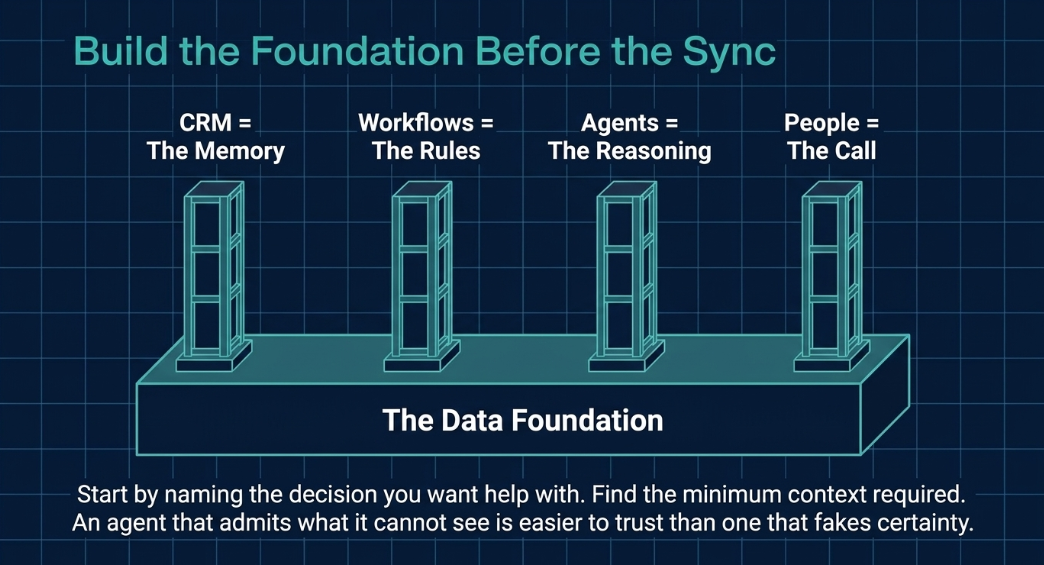
Most of the advice on this topic starts one step too late. Integration vendors sell the full ERP history inside HubSpot. Agencies argue about whether your CRM data is ready for AI in general. Both skip the earlier question: for the one decision you want help with, which records does the agent need, and which does it already read?
We call the answer the Data Foundation: the minimum context the agent needs to make one decision. For a decision such as which customer needs a call this week, that minimum probably includes order history, because a shrinking order pattern is the clearest early sign there is. For other decisions, it may not. You only find out by naming the decision first.
CETDIGIT's own stated approach follows the same order. It starts with the deal and company history already in HubSpot; any outside research is tied to the company's own domain; and it states plainly that it cannot weigh data that is not in HubSpot. That limit is the point. An agent that says what it could not see is easier to trust than one that sounds certain about everything. It runs alongside your team first; it shows what it read, and a person decides what happens next.
HubSpot's Duncan Lennox framed the principle in his product keynote: "You decide what's in your context." That is a decision someone in your business makes on purpose, not a setting left as it was on the day the AI was switched on. Gartner's own language has moved the same way, from AI-ready data to what it calls agent-ready data, including whether agents are using the data they are given in a valid way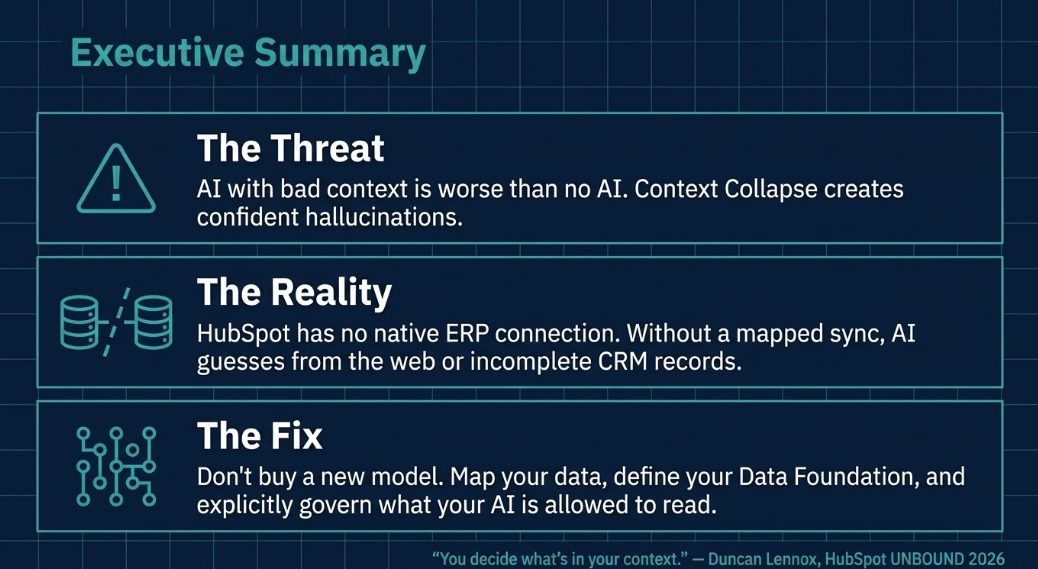
.
It is also why the CRM still matters once you are buying AI, a question this series asked earlier [per rev b]. Connecting what the CRM holds to the revenue it should produce is the work of an AI revenue engine, and it begins with knowing what the agent reads.
Your next step: write down what the AI reads
The next step at this stage is a check you can run yourself this week, not a purchase.
Pick one customer you know well. Pull their order history from the ERP. Open their company record in HubSpot. Ask the AI the question you would ask in an account review, and compare its answer with what you know. Then ask whoever set the AI up for the list of records it reads, including whether it can browse the web, and write that list down where your sales and operations leads can both see it.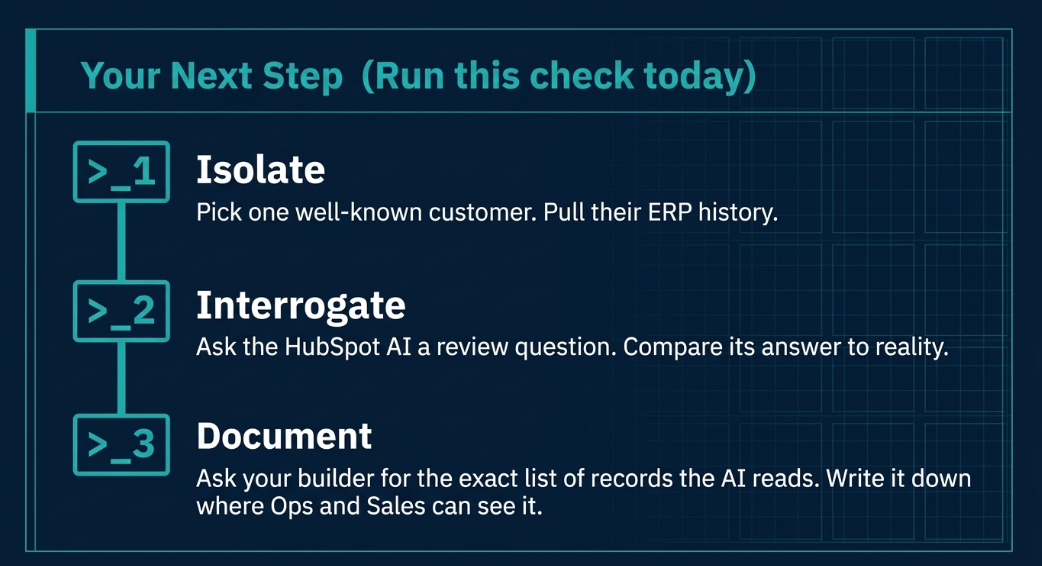
Repeat the check for two more customers: one whose orders are growing and one who has gone quiet in the ERP as well as in HubSpot. Three accounts are enough to tell you whether the AI's picture of your customers matches the business's picture, and whether the gap is a few missing fields or a whole system it has never read.
If the answer and the order history disagree, you have found the gap before a customer did. If you want to see how we approach the question of whether an AI agent in HubSpot can read your ERP order history with a company, that is where we start.
Frequently asked questions
These are the questions buyers ask most often about AI agents in HubSpot and ERP order data.
Can an AI agent in HubSpot read our ERP order history?
HubSpot's UNBOUND 2026 research put it plainly: AI with bad context is worse than no AI. An AI agent in HubSpot can read ERP order history only after that history has been synced into HubSpot records. HubSpot has no native ERP connection; its app marketplace lists third-party apps that sync order and invoice data. Without one of those installed and mapped, the agent answers order questions from whatever HubSpot already holds, which may be nothing at all.
Does HubSpot connect to our ERP natively?
HubSpot's own app marketplace answers this: ERP order and invoice data reaches HubSpot through third-party apps, not through a HubSpot-built connection. HubSpot does have its own order, line-item, and invoice records, but they hold whatever was entered or synced into HubSpot. They are not your ERP's order history unless a sync puts it there, and an AI reading them cannot tell the difference.
Why does the AI sound so sure when it is missing our order data?
HubSpot's UNBOUND 2026 research warned that AI with bad context is worse than no AI, and missing context is the hardest kind to see. The AI reports accurately on the record it reads. If that record shows one call in March and no orders, the answer describes a quiet customer with full confidence. Nothing in the answer tells you a second system holds a different story.
Can an AI agent in HubSpot search the internet for information about our customers?
HubSpot's documentation for building custom agents lists "Browse the web" as one of the two default actions a builder chooses from, beside "Read your HubSpot CRM records." Whether your agent does either depends on the choices made when it was built. Ask for the list. An agent that answers questions about your customers from the web rather than your own records is guessing, however well it writes.
Do we need to clean all our data before turning on an AI agent?
Gartner's framing has moved from AI-ready data to what it calls agent-ready data, which includes checking whether agents use the data they are given in a valid way. That points to a narrower first step than a full clean-up: name the one decision you want help with, find the minimum records it needs, and check whether the agent reads them. Order history may be on that list, or it may not.
What should we ask an AI vendor before we trust its answers about our customers?
Yamini Rangan said in her HubSpot UNBOUND 2026 keynote: "It is your data, it is your context, and therefore it is your advantage." So ask the vendor which records the agent reads, whether it can browse the web, whether it reads anything outside HubSpot, and what it says when a record is empty. If the answers are vague, the confidence of the output means little. That question is where CETDIGIT's AI implementation model starts.
Find out what your AI reads
If your orders and your customer conversations live in different systems, start by finding out which records your AI can read.

Leave a Comment