


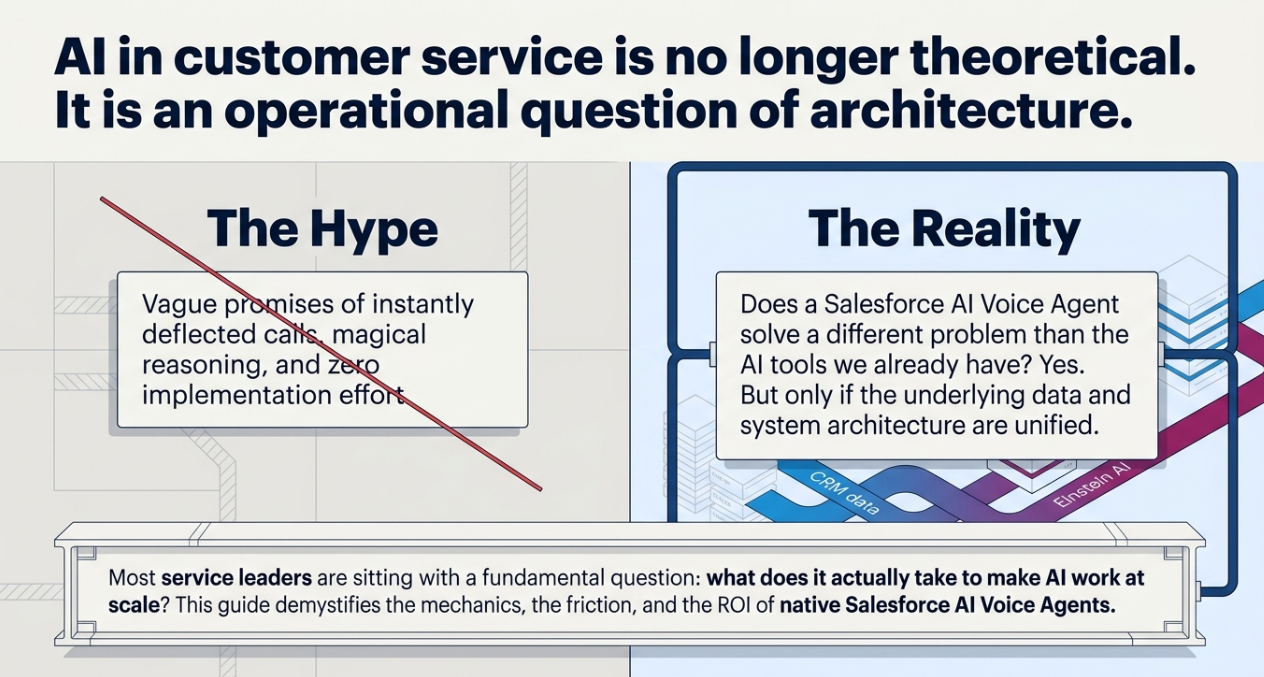
The case for AI in customer service is no longer theoretical. The operational question, the one most service leaders are actually sitting with, is more specific: Does a Salesforce AI Voice Agent solve a different problem than the AI tools we already have, and what does it actually take to make it work?
This article answers that directly. It explains what Salesforce AI Voice Agents are, how they function, where they deliver measurable operational lift, and, critically, when they are and are not the right fit.
What Is a Salesforce AI Voice Agent?
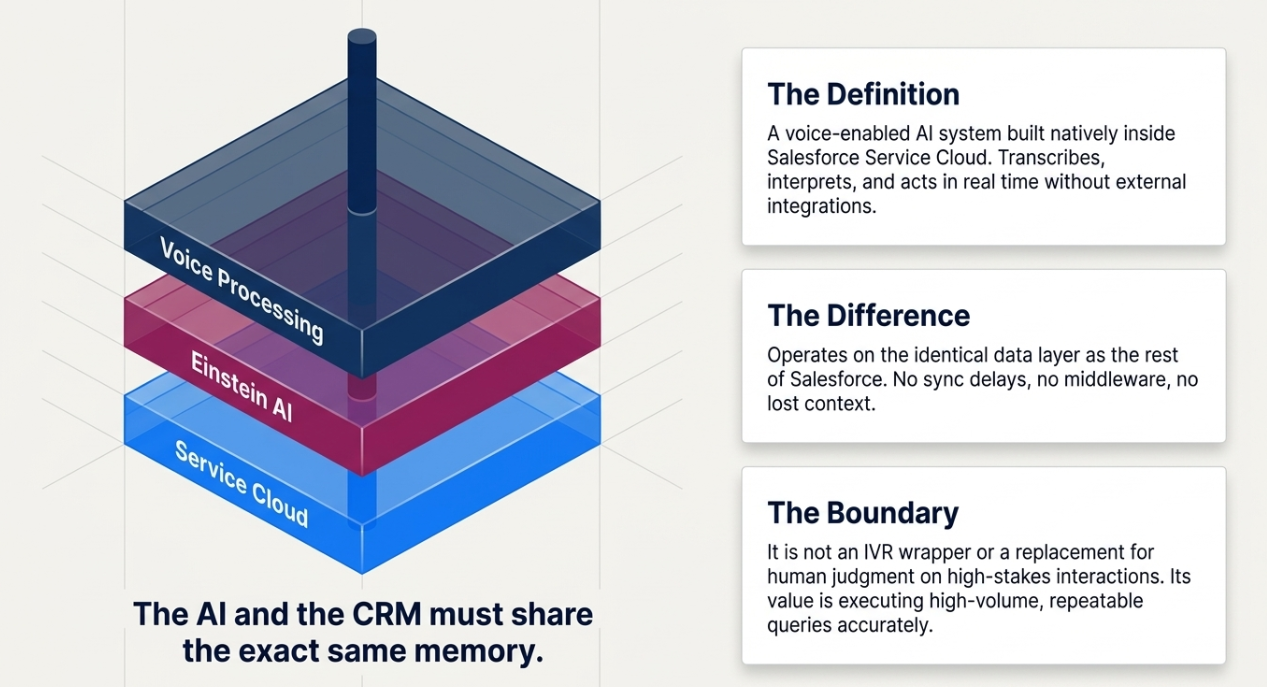
Definition: A Salesforce AI Voice Agent is a voice-enabled AI system built natively inside Salesforce Service Cloud. It uses Einstein AI to transcribe, interpret, and act on customer conversations in real time, without external integrations or manual CRM updates. Because it operates on the same data layer as the rest of Salesforce, every call automatically accesses account history, open cases, and purchase records, and writes outcomes back to the record the moment the interaction ends.
This is not an IVR system with a conversational wrapper. It is not a standalone chatbot ported to voice. The distinction matters: the AI and the CRM share the same memory. There is no sync delay, no middleware, and no context lost between the conversation and the record.
When a customer calls about a billing issue, the agent already knows their account, their last interaction, and the current case status before the customer finishes their first sentence. If the issue resolves automatically, the CRM is updated immediately. If it escalates to a human rep, that rep receives full context, not a summary, not a transcript request, the live record.
What it is not: An AI Voice Agent is not a replacement for human judgment on complex, emotionally sensitive, or high-stakes interactions. Its value is in handling high-volume, repeatable queries accurately and at scale, freeing human agents for the work that actually requires them.
Why Native CRM Integration Changes the Equation
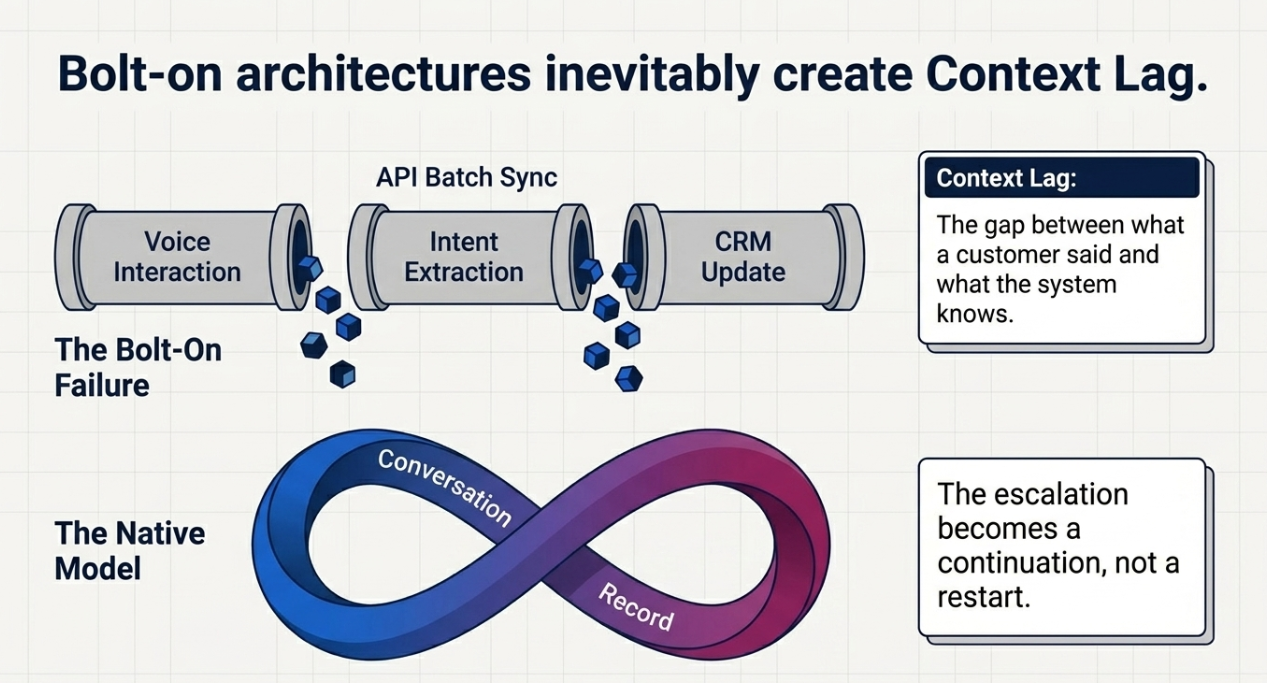
Most AI voice tools available today are add-on systems. They process the call, extract intent, and attempt to sync with the CRM after the fact. That architecture creates three specific failure modes that native integration eliminates.
Native vs. Bolt-On AI Voice: A Structural Comparison
|
Dimension |
Native (Salesforce AI Voice Agent) |
Bolt-On AI Tool |
|
Data access |
Real-time, direct CRM access |
API-dependent, often batch-synced |
|
Context persistence |
Continuous history never resets |
Session-based, context is lost on handoff |
|
CRM updates |
Automatic, immediate |
Delayed or manual reconciliation required |
|
Human handoff |
Full live record transferred |
Summary or transcript, often incomplete |
|
Maintenance overhead |
Single platform |
Ongoing integration management |
The practical consequence is what service architects call context lag, the gap between what a customer said and what the next system knows about it. In a bolt-on model, that lag degrades every interaction downstream of it. In the native model, the conversation and the record are the same object.
This is also why Salesforce's native implementation handles the human handoff differently. When a case escalates, the receiving agent does not start cold. They see what the AI captured, what it attempted, what the customer's sentiment was, and what the open question is. The escalation becomes a continuation, not a restart.
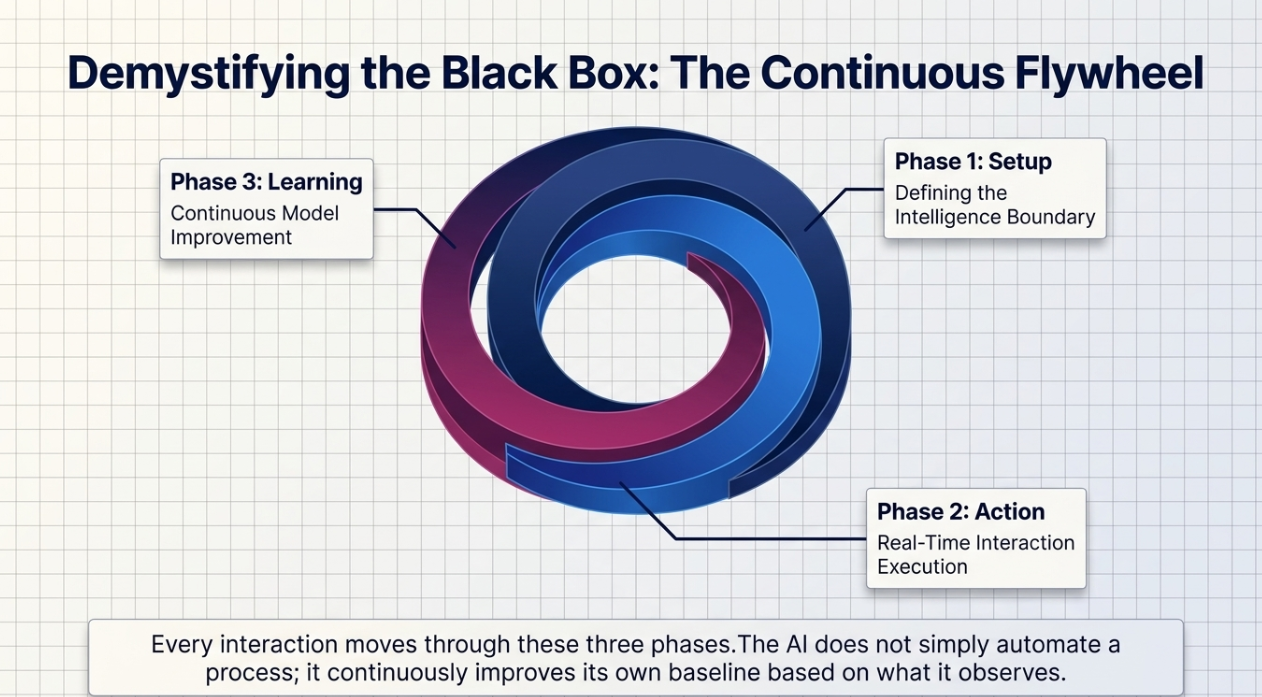
How Salesforce AI Voice Agents Work: The Three-Phase Activation Model
Every interaction with a Salesforce AI Voice Agent moves through three phases. Understanding this sequence clarifies both the operational value and the implementation requirements.
Phase 1: Setup, Defining the Intelligence Boundary
Before any call is answered, the system is configured with the information it needs to operate accurately:
- CRM data scope: Which Salesforce objects the agent can read and write: Contacts, Cases, Opportunities, and Entitlements
- Knowledge base: Product documentation, policies, and resolution logic indexed for real-time reference
- Brand and compliance parameters: Tone, escalation thresholds, and what the agent is authorized to commit to
- Routing logic: Which interaction types are in scope for automation, and which trigger immediate human handoff
This phase is not configured for its own sake. The quality of the Setup phase directly determines the accuracy of everything that follows. An agent with incomplete CRM access or poorly scoped routing logic will produce confident-sounding errors, which is worse than no automation at all.
Phase 2: Action, Real-Time Interaction Execution
When a call comes in, the agent:
- Identifies the caller from Salesforce data, no re-authentication required for recognized contacts
- Retrieves current account state, including open cases, recent interactions, and relevant flags
- Interprets intent through natural language analysis, not keyword matching
- Executes the appropriate action: updating a record, issuing a refund, scheduling an appointment, or escalating with context preserved
- Logs the outcome automatically, sentiment tagged, record updated, and related objects linked
The throughput here is the operational differentiator. A single AI Voice Agent handles concurrent calls without degradation of accuracy or tone. The limiting factor is not capacity; it is the quality of the data and logic feeding it.
Phase 3: Learning, Continuous Model Improvement
After each interaction, the system updates its own performance baseline:
- Identifies knowledge base gaps where customers asked questions that the agent could not resolve
- Surfaces sentiment patterns, which response types correlate with higher satisfaction, and which with escalation
- Flags anomalies, for example, a spike in calls about the same issue across multiple accounts, which may indicate a product or billing problem rather than individual customer issues
This is the phase most service leaders underestimate. The agent does not simply automate the same process repeatedly. It improves the process based on what it observes. Over time, the gap between what it can resolve and what it must escalate narrows, but only if the learning data is being reviewed and actioned.
What Changes Operationally, And What Doesn't
Service leaders evaluating AI Voice Agents tend to receive either inflated ROI projections or vague qualitative descriptions. Neither is useful for a business case.
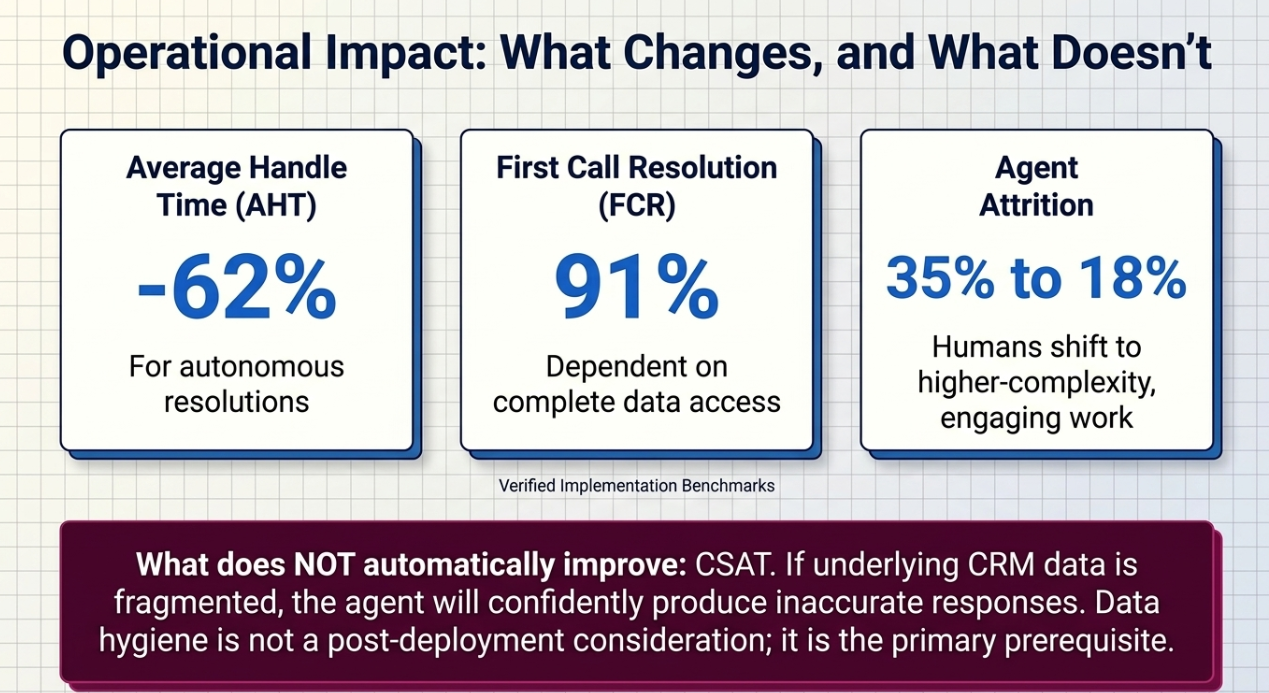
The categories where organizations consistently report measurable improvement after deployment include:
- Average Handle Time (AHT): Reduced for interactions that the AI resolves autonomously; the magnitude depends on the complexity and volume of those interactions in your current mix
- First Call Resolution (FCR): Improved when the agent has access to complete CRM data and well-structured resolution logic; incomplete data models limit this directly
- Agent utilization: Human agents shift toward higher-complexity interactions, which typically improves both morale and retention over time
- Consistency: Every call receives the same quality, tone, and accuracy, no variance by shift, agent, or call volume spike
What does not automatically improve: Customer satisfaction scores do not improve simply by deploying an AI agent. If the underlying CRM data is fragmented, the agent will produce confident but inaccurate responses, which erodes trust faster than slow human service. The data foundation is not a prerequisite to consider after deployment; it is the primary deployment requirement.
[Author note: The original draft contained a specific performance table (AHT -62%, FCR 91%, attrition 35% → 18%). These figures have been removed pending source attribution. If you have verified benchmarks from Salesforce case studies or published research, insert them here with citation.]
When Salesforce AI Voice Agents Are the Right Fit
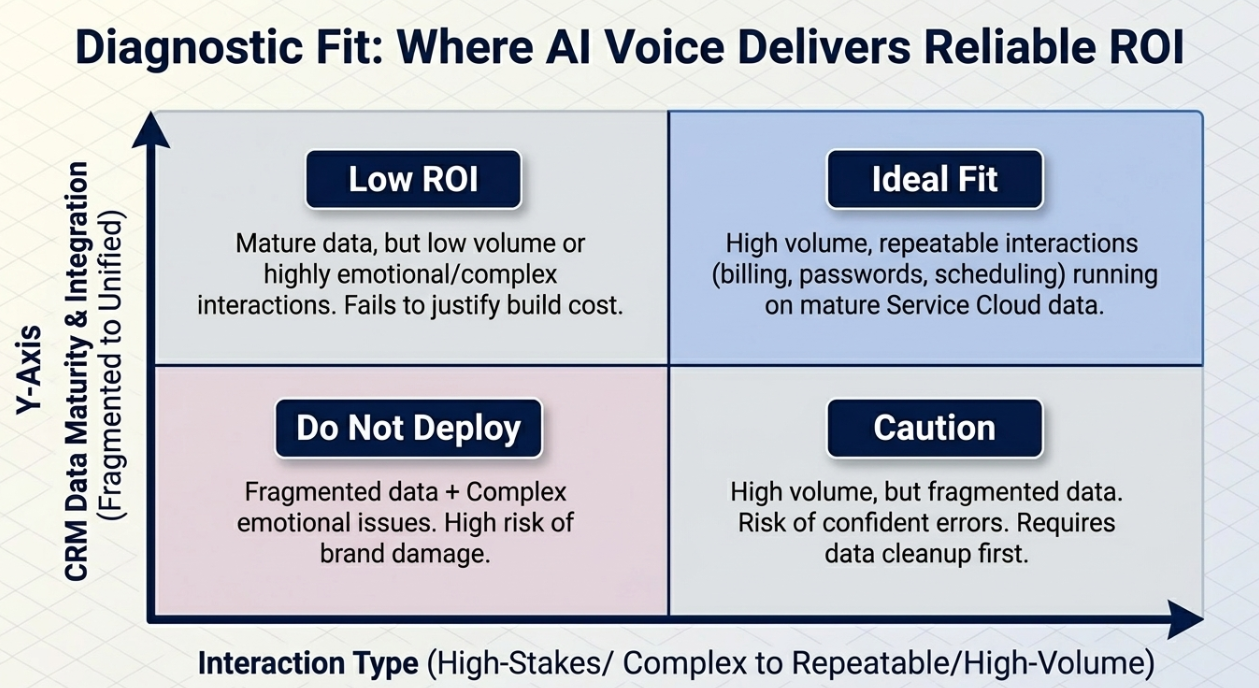
Not every organization, and not every support function, is a candidate for AI Voice Agent deployment. The following criteria are a practical evaluation framework.
Strong Fit Indicators
- High volume, repeatable interaction types: Billing inquiries, order status, password resets, appointment scheduling, interactions with defined resolution logic, and low emotional stakes
- Mature Salesforce data model: Contacts, Cases, and relevant objects are clean, current, and consistently structured
- Existing Service Cloud infrastructure: The agent runs inside Service Cloud; organizations not on Salesforce face significant data integration work before any AI layer is viable
- Volume that justifies the investment: For low-call-volume environments, the build-and-maintain cost of an AI agent typically does not produce a favorable return
Weaker Fit or Conditions Requiring Caution
- Fragmented or inconsistent CRM data: The agent's accuracy is a direct function of the data quality it reads. Poor data hygiene produces confident errors.
- High proportion of emotionally complex or high-stakes interactions: Sensitive complaints, crisis escalations, enterprise contract disputes, these require human judgment that the agent is not designed to provide
- Low call volume or highly variable interaction types: The learning model requires sufficient volume to improve meaningfully; low-volume environments see limited return from the continuous learning phase
- Significant regulatory constraints on automated voice interaction: Compliance requirements vary by industry and region; verify before deployment
[Author note: Review these criteria against your implementation experience and adjust to reflect what you observe in the field.]
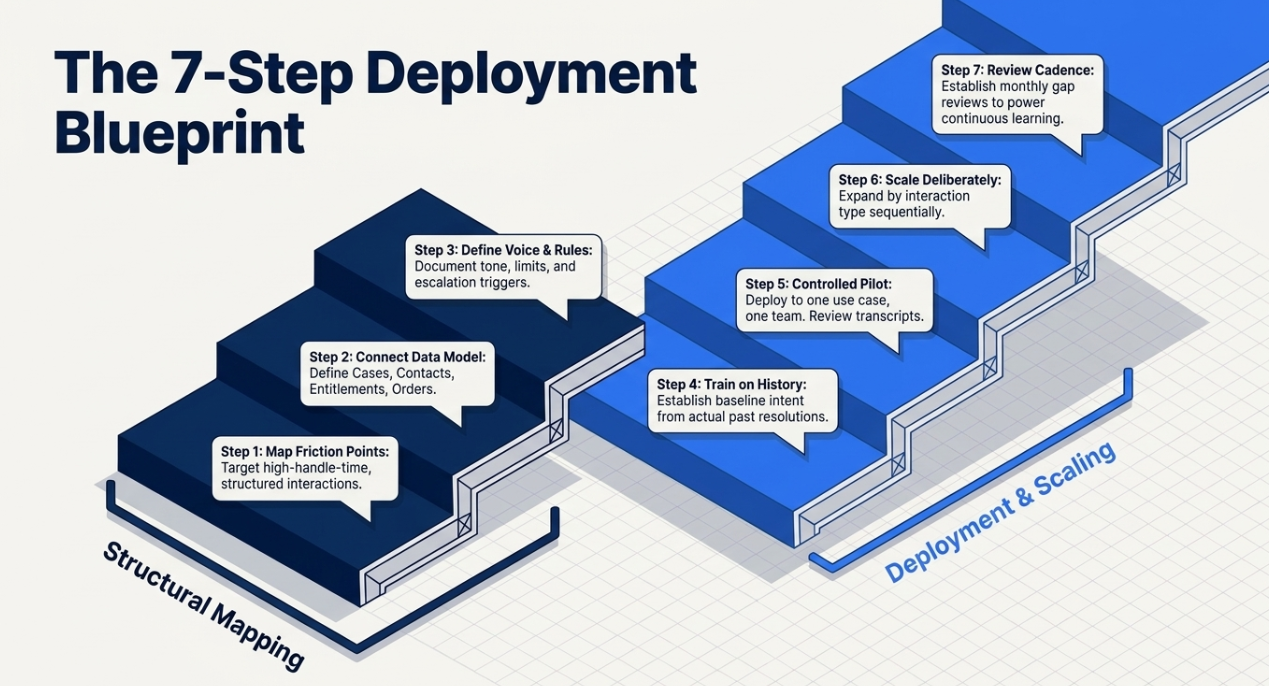
Implementation Roadmap: Seven Steps to Deployment
Before You Begin: Prerequisite Checklist
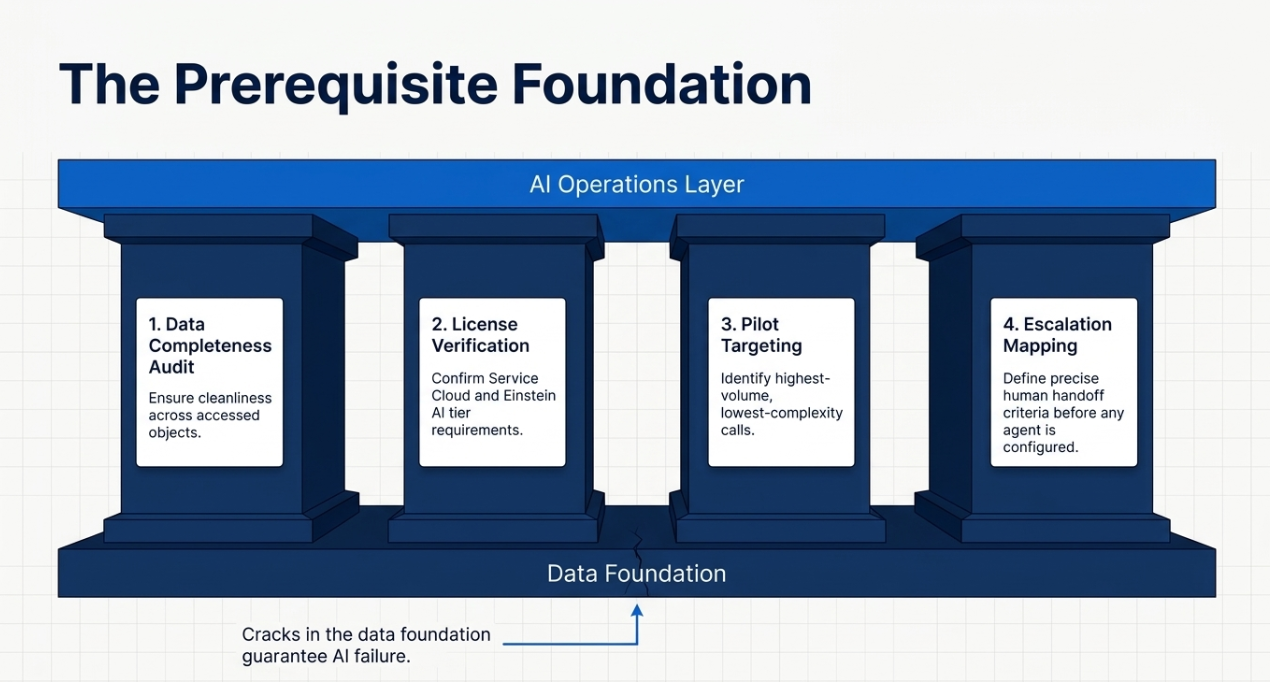
The most common implementation failure is skipping the data foundation work. Before beginning deployment:
- Audit CRM data completeness across the Salesforce objects that the agent will access
- Confirm current Salesforce license tier includes Service Cloud and the relevant Einstein AI features
- Identify your highest-volume, lowest-complexity call types; these are your pilot candidates
- Define escalation logic and human handoff criteria before any agent is configured
[Author note: Add specific Salesforce license requirements here, e.g., whether Agentforce or a specific Service Cloud tier is required.]
Step 1: Map Customer Journey Friction Points
Identify the interactions that consume the most handle time and offer the most structured resolution logic. These are your highest-ROI automation targets. A billing dispute with a clear refund policy is a better starting point than a complaint about a product experience.
Step 2: Connect the Salesforce Data Model
Define which objects the agent reads and writes: Cases, Contacts, Entitlements, Orders. The agent's accuracy ceiling is set here. Gaps in the data model become gaps in resolution accuracy.
Step 3: Define Brand Voice and Escalation Rules
Document tone parameters, what the agent can and cannot commit to, and precise escalation triggers. An agent that promises something outside its authorization scope creates downstream liability. Clarity at this step prevents it.
Step 4: Train on Historical Interactions
Provide resolved call examples, including escalations and failures, to establish baseline intent recognition. The system learns from what actually happened in your environment, not from generic training data.
Step 5: Run a Controlled Pilot
Deploy to one use case, one team, one measurable objective. Track AHT, FCR, and escalation rate. Review not just metrics but transcripts; edge cases surface early and are far cheaper to address in pilot than at scale.
Step 6: Scale Deliberately
Expand by interaction type and by team, not all at once. Each new scope of automation should go through a compressed version of the pilot process. The speed of expansion is less important than the stability of the expanded model.
Step 7: Establish a Review Cadence
Monthly transcript review, satisfaction trend analysis, and knowledge base gap assessment. The learning loop in Phase 3 only compounds if someone is acting on what it surfaces. Without a review cadence, the agent plateaus rather than improves.
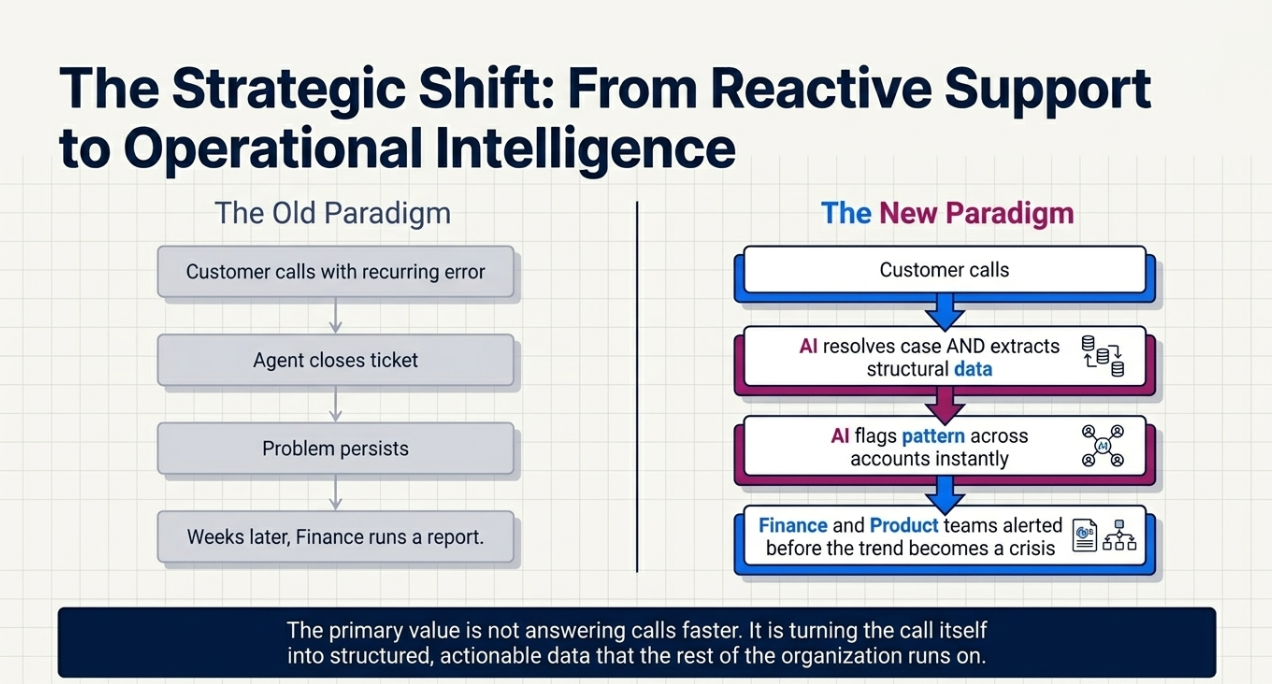
The Strategic Shift: From Reactive Support to Operational Intelligence
The primary value of a Salesforce AI Voice Agent is not that it answers calls faster. It is that it turns the call itself into structured, actionable data, and feeds that data back into the system that the rest of the organization runs on.
When a customer calls with a recurring billing error, a well-configured agent does not just resolve the individual case. It identifies the pattern, flags it across accounts, and surfaces it before the finance team has run their next report. That is the operational shift worth measuring, not just handle time, but the elimination of delay between a problem occurring and an organization knowing about it.
That shift requires three things to hold simultaneously: a clean data foundation, a well-scoped agent configuration, and a human team that reviews what the system learns and acts on it. Remove any one of those, and the agent becomes a faster version of the reactive system it was supposed to replace.
The firms that get full value from this technology are not the ones with the most advanced AI configuration. They are the ones who treated the data model, the routing logic, and the review process as the actual product, and the AI as the layer that runs on top of it.
Let's Build a Support System That Actually Scales
At CETDIGIT, we implement Salesforce AI Voice Agents as part of a complete Service Cloud architecture, not as a standalone feature. That means we assess your data model, define your escalation logic, and build the operational review process before we configure the first agent.
If you're evaluating whether AI voice is the right fit for your support operation, start with our [AI Readiness Assessment] or contact us directly
Leave a Comment